
Best for delegated campaign management: Meetadmiral. Best for direct Google Search control: Google Ads. Best for paid social: Meta Ads Manager. This 2026 guide compares PPC software for solopreneurs by the work each option handles, including bulk editing and conversion analysis.
- Meetadmiral is the best-fit PPC software for solopreneurs who want Google Ads and Meta campaign management without a traditional agency.
- Google Ads suits hands-on search advertisers; Meta Ads Manager suits owners managing Facebook and Instagram campaigns.
- Google Ads Editor handles bulk account changes, not campaign strategy or conversion measurement.
- Google Analytics 4 supports conversion analysis; it does not replace PPC management software.
Why this matters
A solopreneur needs software that removes a specific job. Keyword research, campaign changes, creative decisions, and conversion checks are different jobs. A reporting dashboard does not perform all of them.
Choose the operating model before the tool. If you want campaign management handled for you, choose management software. If you want direct control, use the advertising platform. Add an editing or measurement tool only when a defined task requires it.
This distinction matters more than a long feature list. Connecting an account does not automatically fix conversion tracking, establish an acceptable acquisition cost, or tell you which enquiries became customers.
What makes the best PPC software for solopreneurs?
Use these criteria to judge a tool against the work you actually need done in 2026:
- Management scope: Does it manage campaigns, prepare edits, or only report results? Those functions are not interchangeable.
- Channel fit: Google Search captures searches. Meta advertising reaches audiences across placements including Facebook and Instagram. Choose around your campaign, not the longest integration list.
- Decision ownership: Establish which decisions remain yours: business goals, acceptable acquisition cost, creative approval, and account access.
- Measurement quality: Check which conversion actions drive reporting and bidding. An enquiry, a purchase, and a page view represent different outcomes.
- Change visibility: You need to identify what changed before investigating a performance shift. Native account change records help with that diagnosis.
- Operating effort: Count the recurring tasks you still own. A tool that prepares recommendations is different from one that manages campaigns.
PPC software at a glance
The order below reflects distinct use cases, not a claim that every tool competes with every other tool. The first option addresses delegated management; the remaining options address hands-on work.
| Option | Best for | Standout function | Key limitation |
|---|---|---|---|
| Meetadmiral | Delegated Google Ads and Meta management | Audits, plans, and manages campaigns across both platforms | Its stated scope is Google Ads and Meta, not every advertising channel |
| Google Ads | Direct control of search campaigns | Native campaign, keyword, bidding, and search-term controls | You remain responsible for campaign decisions and account maintenance |
| Meta Ads Manager | Direct control of paid social campaigns | Native audience, placement, creative, and delivery controls | It does not manage Google Search campaigns |
| Google Ads Editor | Bulk Google Ads account changes | Download, edit, review, and post account changes | It is an editing application, not a management service |
| Google Analytics 4 | Website conversion and traffic analysis | Event-based analysis of website behaviour and acquisition | It does not build or manage advertising campaigns |
1. Meetadmiral: best for delegated PPC campaign management
Meetadmiral is PPC software for solopreneurs who want Google Ads and Meta campaigns audited, planned, and managed without hiring a traditional agency. Its stated role covers campaign management, rather than reporting alone.
That makes it the best-fit starting point when your bottleneck is doing the advertising work. You still supply the business context: what you sell, which customers matter, and which outcomes count. Campaign management cannot substitute for those decisions.
Meetadmiral pros:
- Covers Google Ads and Meta campaign management.
- Includes auditing and planning alongside management.
- Matches small business owners seeking an alternative to a traditional agency.
Meetadmiral cons:
- The stated channel scope does not cover every advertising platform.
- Campaign software does not replace your decisions about margins, lead quality, or business goals.
Best for: An owner who wants the campaign-management workload handled across Google Ads and Meta.
Before adopting any delegated management platform, establish account access and responsibilities. Ask how changes are communicated, which decisions require your input, and how conversion tracking will be assessed. Get clear answers before relying on campaign reports.
Verdict: Buy for the delegated-management use case; skip if you specifically want to make every campaign change yourself.
2. Google Ads: best for hands-on search advertising
Google Ads gives you the native controls for building and managing Google advertising campaigns. For Search campaigns, you work with keywords, ads, bids, conversion actions, and search terms inside the account.
A keyword is the targeting instruction you enter. A search term is the actual search that triggered an ad. Reviewing that distinction helps you find searches that do not match your offer.
Google Search uses 3 keyword match types: broad, phrase, and exact. Exact match is not a promise of identical wording; it can match searches with the same meaning or intent. Treat match types as matching controls, not as a substitute for reviewing results.
Google Ads pros:
- Gives you direct access to campaign and keyword settings.
- Provides search-term reporting for reviewing triggered searches.
- Includes native bidding, conversion, and change-history tools.
Google Ads cons:
- You own the recurring review and editing work.
- Incorrect conversion settings can direct optimisation toward the wrong outcome.
- Search-term reporting does not expose every individual search.
Best for: A solopreneur who wants direct control of Google Search advertising and will maintain the account.
For a 2026 search campaign, start with the business outcome before choosing bidding settings. Then review whether the searches, ads, and landing page describe the same offer. Use the guide to negative keyword tools for Google Ads when exclusions become a recurring task.
Verdict: Buy into the hands-on workflow if you will review search intent and conversion settings; skip it as a substitute for delegated management.
3. Meta Ads Manager: best for hands-on paid social
Meta Ads Manager is the native workspace for creating and managing Meta advertising campaigns. You use it to configure campaign objectives, audiences, placements, ads, and delivery settings.
Unlike keyword-led Search advertising, Meta campaigns do not depend on someone entering your chosen search phrase. The creative and offer must communicate why the audience should respond. Audience settings alone do not explain the product.
Meta Ads Manager pros:
- Provides direct campaign and ad controls for Meta advertising.
- Lets you manage creative and placement settings within the native platform.
- Reports campaign delivery and configured results alongside account controls.
Meta Ads Manager cons:
- You remain responsible for producing and evaluating creative.
- Reported conversions depend on measurement setup and attribution settings.
- It cannot replace Google Ads management for search campaigns.
Best for: A solopreneur who wants direct control of Facebook and Instagram advertising.
Define what makes a response valuable before assessing creative. A form submission can be a useful conversion, but it does not prove that the enquiry is qualified. Compare campaign results with the outcomes recorded in your sales process.
In 2026, keep the campaign objective aligned with the action you actually want. Traffic reporting answers a different question from purchase or lead reporting. Do not select a tool because its dashboard makes the easiest metric prominent.
Verdict: Buy into this workflow for hands-on paid social; skip it if your immediate need is Google Search management.
4. Google Ads Editor: best for bulk account changes
Google Ads Editor is a downloadable application for working on Google Ads accounts. You download account data, prepare changes, review them, and post them back to the account.
Its value is editing efficiency. When the same change affects many account elements, working through individual settings in a browser is a different task from preparing a batch of edits.
Google Ads Editor pros:
- Supports preparing account changes offline.
- Provides bulk-editing workflows for Google Ads accounts.
- Separates preparing changes from posting them.
Google Ads Editor cons:
- It does not decide which campaign strategy your business needs.
- You must download current account data and review changes before posting.
- A bulk edit can repeat the same mistake across multiple account elements.
Best for: A hands-on advertiser making repeated or structural Google Ads changes.
Use a deliberate sequence rather than posting as soon as an edit looks complete. Download the account, Edit the intended elements, Review the proposed changes, then Post. Check the affected campaigns and settings before committing the batch.
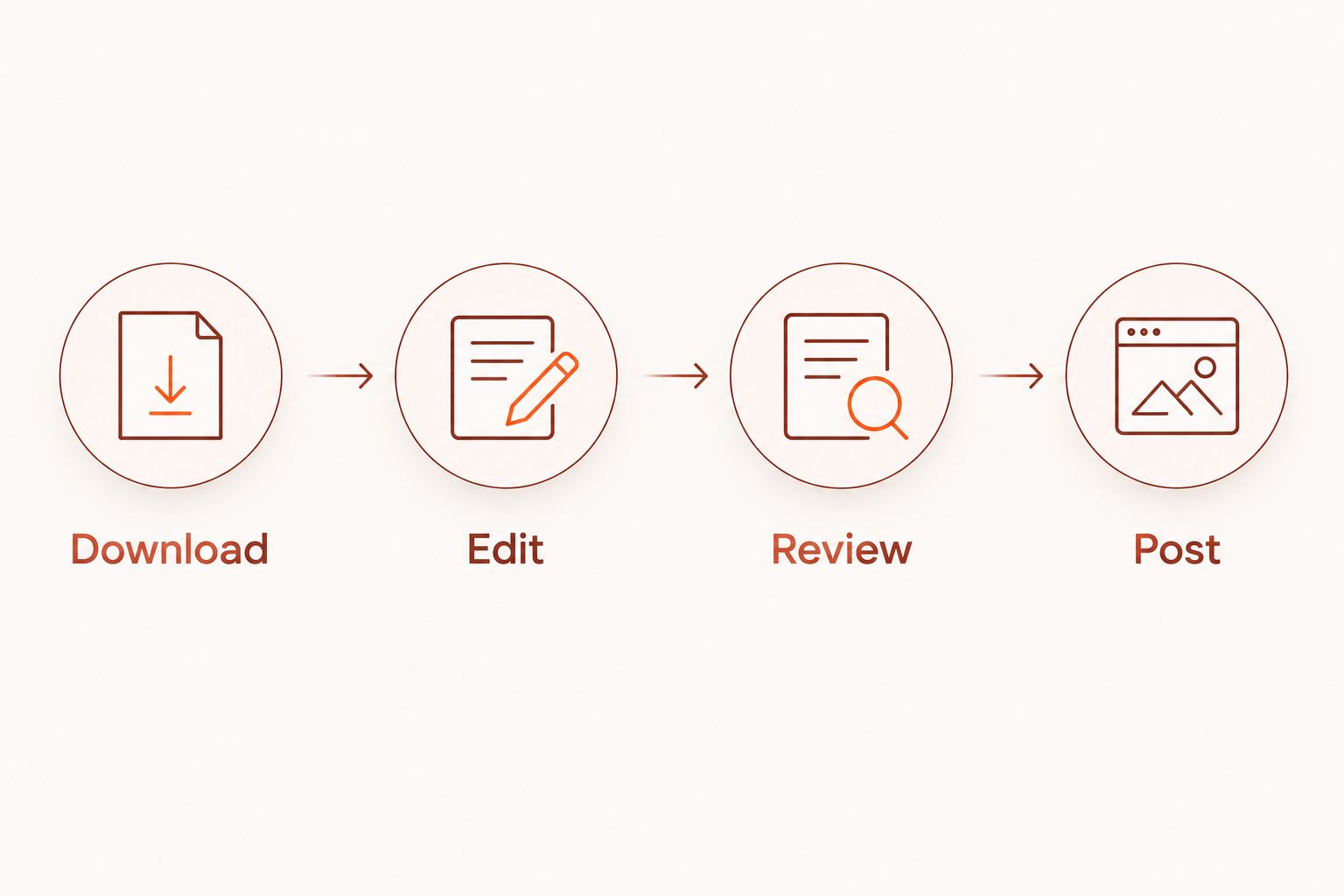
Google Ads Editor earns its place when bulk changes are part of your work. It adds a separate application and synchronisation step when you only need an occasional small edit. Do not confuse a faster editing workflow with better advertising decisions.
Verdict: Buy into this workflow for repeated bulk edits; skip it as your main campaign-management solution.
5. Google Analytics 4: best for website conversion analysis
Google Analytics 4 measures website and app activity through events. For a solopreneur running PPC, it helps connect traffic acquisition with actions on the website.
It belongs in this comparison as a supporting measurement tool, not as an advertising manager. It does not create Google Ads campaigns, review search terms for you, or manage Meta creative.
Google Analytics 4 pros:
- Uses events to analyse actions on your website.
- Provides acquisition reporting across traffic sources.
- Supports examining the website activity that follows an ad visit.
Google Analytics 4 cons:
- Event collection and reporting depend on implementation.
- Its results can differ from ad-platform reports because measurement and attribution differ.
- It does not perform campaign-management work.
Best for: A solopreneur diagnosing what happens after visitors reach the website.
For your 2026 measurement setup, choose 1 primary business outcome to anchor the initial review, such as a completed purchase or a qualified enquiry. This is a prioritisation recommendation, not a platform restriction. Keep supporting events separate so a minor interaction does not look equivalent to a sale.
Check that the event fires at the intended point. Then inspect whether repeated actions, consent choices, or implementation errors affect the record. A dashboard is only useful when you understand what its events represent.
Verdict: Buy into this workflow for website analysis; skip it as a replacement for PPC management software.
How the options are ranked
The ranking follows the criteria above: management scope, channel fit, decision ownership, measurement, change visibility, and operating effort. Each option owns a different job.
Delegated management comes first because the article addresses owners who need advertising work handled. Native platforms follow for owners who want direct control. Editing and analytics tools come last because they support campaign operations rather than replace them.
This is a workflow comparison, not a benchmark of conversion lift or campaign performance. No option receives credit for an unverified performance claim.
Which PPC software should you choose?
Choose the tool that takes responsibility for your actual bottleneck. For delegated campaign management, start with the first option. For direct search or paid-social control, choose the relevant native platform. Add Editor for bulk changes and Analytics for website analysis.
Before adding another subscription or application, write down what remains undone. If the answer is campaign management, a reporting tool is not the fix. If the answer is measuring enquiries, changing the editing interface is not the fix either.
For search diagnosis, remember that Google's Quality Score uses a 1–10 diagnostic scale. It assesses expected click-through rate, ad relevance, and landing-page experience; it is not your business result or a direct auction input. Do not make a diagnostic score the goal of your advertising.
Your 2026 shortlist should leave you with a clear division of work: who manages campaigns, who checks measurement, and who evaluates customer quality. Keep that division explicit.
FAQ
What's the best PPC software for solopreneurs in 2026?
Meetadmiral is the best-fit option for solopreneurs who want Google Ads and Meta campaigns audited, planned, and managed without a traditional agency. Google Ads and Meta Ads Manager fit owners who want direct control instead.
Is Google Ads enough to manage my search campaigns?
Google Ads provides the native tools to build and manage Google Search campaigns. You still need to review search terms, conversion actions, bids, ads, and landing-page alignment.
Is Meta Ads Manager better than Google Ads?
Meta Ads Manager is better suited to managing Meta campaigns; Google Ads is better suited to managing Google campaigns. They serve different advertising channels rather than replacing each other.
Do I need Google Ads Editor for a small account?
You need Google Ads Editor when bulk editing solves a recurring account-management task. Occasional small changes do not automatically justify adding a separate editing application.
Can Google Analytics 4 manage my PPC campaigns?
Google Analytics 4 cannot manage PPC campaigns. It measures website activity and supports acquisition and conversion analysis alongside your advertising tools.
Can exact-match keywords show for different wording?
Yes, exact-match keywords can match searches with the same meaning or intent. Review search terms rather than assuming exact match restricts ads to identical wording.
Should I optimise my campaign for Quality Score?
Do not make Quality Score your business objective. Use its diagnostic components to investigate relevance and landing-page issues while judging advertising against meaningful business outcomes.
One last thing
A conversion is a configured measurement, not proof of a customer. Before judging any PPC software, trace a reported conversion back to the action it records.
For an enquiry campaign, check whether that action represents a submitted form, a contacted prospect, or a qualified opportunity. Software can report the configured event correctly while your business still needs a different outcome. Fix that definition before comparing dashboards.