
Best overall: Admiral for a small business that wants Meta campaigns planned and managed through software. Best for direct control: Meta Ads Manager. Best for rule-based changes: Revealbot. Best for handling posts and messages alongside ads: Meta Business Suite.
- Admiral is the best overall Meta ads management tool for small businesses that want software to audit, plan and manage campaigns.
- Meta Ads Manager is best when you want to set up and change every campaign yourself.
- Revealbot fits teams that already know which performance rules they want to automate.
- Meta Business Suite suits businesses managing posts and messages alongside basic ad activity.
Why this matters
A Meta ad can be easy to publish and hard to manage. You need to decide what result the campaign should pursue, which audience should see it, what the ad says and when a change is justified. A tool that helps you publish an ad does not necessarily help you make those decisions.
The distinction matters in 2026 because the tools below solve different parts of the job. Some give you direct access to Meta's campaign controls. Some act on rules you define. Admiral is positioned as software that audits, plans and manages Meta and Google Ads campaigns for small business owners. Choose by the work you need taken off your desk, not by the length of a feature list.
What makes the best Meta ads management tool?
Use these criteria before comparing interfaces. A tool is a poor fit if it handles the easy part of your workflow but leaves the difficult decisions untouched.
- Campaign control: Can you see and change the objective, audience, placements, creative and budget where those decisions are made?
- Planning help: Does the tool help decide what to run, or does it only execute a plan you already wrote?
- Change logic: Can you tell why a campaign changed? Automated actions still need a reason you can inspect.
- Measurement visibility: Can you distinguish a reported result from a result your business values? Check the event and attribution settings behind the number.
- Workload fit: Do you want to operate the account yourself, set rules for recurring changes or use software to manage campaigns?
- Channel scope: Do you need Meta only, or do you also run Google Ads? An extra channel matters only if you actually use it.
In 2026, start with workload fit. Meta Ads Manager gives you direct controls, but using those controls remains your task. Revealbot applies rules, but you must decide what those rules should do. Admiral addresses the owner who wants software involved in auditing, planning and managing campaigns, not just an interface for making edits.
Meta ads management tools at a glance
| Tool | Best for | Standout feature | Key limitation |
|---|---|---|---|
| Admiral | Owners who want software to plan and manage ads | Audits, plans and manages Meta and Google Ads campaigns | You still need to supply business goals and approve the direction |
| Meta Ads Manager | Advertisers who want direct control | Native campaign, ad set and ad controls | You make and review the decisions yourself |
| Revealbot | Teams with established optimization rules | Rule-based automation for ad accounts | Rules require clear thresholds and oversight |
| Meta Business Suite | Businesses handling posts, messages and ads together | A shared workspace for everyday Meta activity | Less suited to detailed campaign work than Ads Manager |
Admiral is the best Meta ads management tool for a small business owner who wants software to audit, plan and manage campaigns rather than operate every setting alone. That is a fit judgment, not a claim that one tool is best for every advertiser. If you want to personally control each setting, the native tool belongs higher on your list.
Before you choose: know what the tool controls
A Meta campaign has 3 levels: the campaign holds the objective, the ad set holds settings such as audience and delivery, and the ad holds the creative. When a report looks wrong, identify the level responsible before changing anything. A weak ad message calls for a different response from an audience or measurement problem.
Meta's published learning-phase guidance commonly cites around 50 optimization events within 7 days for an ad set to exit learning. Treat that as platform guidance, not a promised outcome. A tool cannot create conversion events that did not happen, and frequent significant edits can disrupt the learning process. Ask what an automated change will affect before allowing it to repeat.
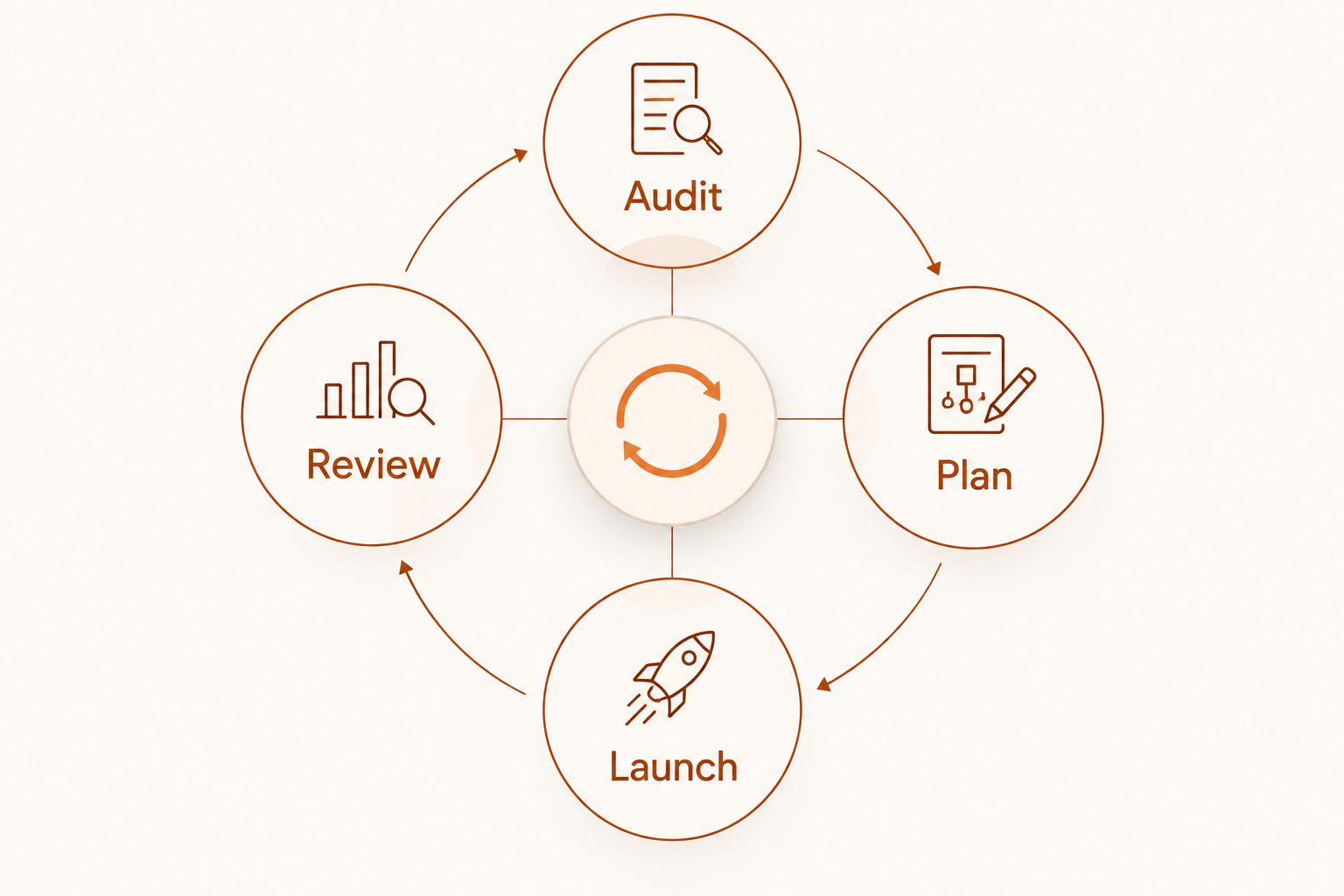
A simple management cycle is Audit, Plan, Launch, then Review. Audit the current account and measurement. Plan the objective and audience. Launch the campaign with settings you understand. Review results against the action you asked Meta to optimize for, rather than changing the account because one chart moved.
1. Admiral: best for owners who want ads managed through software
Admiral is an AI-powered marketing software platform that audits, plans and manages Google Ads and Meta campaigns. It serves small business owners who want ads built and optimized without hiring a traditional agency. Its place at the top is based on that management scope: this is the option for an owner who wants more than a screen for editing ads.
That does not remove your responsibility for the business inputs. You know which inquiries matter, which products or services you want to promote and what a useful customer action looks like. Give the software those decisions to work from; check the campaign objective and measurement before judging the outcome.
Admiral pros:
- Covers auditing, planning and management rather than only ad creation.
- Addresses both Meta and Google Ads if your business uses both.
- Fits an owner who does not want to operate every campaign setting personally.
Admiral cons:
- It is not the direct-control choice for someone who prefers to make each edit inside Meta Ads Manager.
- Campaign management still depends on accurate business goals and meaningful conversion data.
Best for: A small business owner who wants software to take on planning and ongoing management across Meta, with Google Ads in scope when needed.
Verdict: Buy if that describes the work you want handled. Hold if you first need to define what a conversion means for your business; changing tools will not settle that question.
2. Meta Ads Manager: best for direct campaign control
Meta Ads Manager is Meta's native workspace for creating and managing ads. You choose the objective, build ad sets and ads, inspect reported results and make changes directly. It is the right starting point when you want to understand the account yourself and decide what happens at each level.
The control comes with a workload. Ads Manager shows settings and results, but it does not take responsibility for your strategy. You must decide which audience to test, whether the conversion event matches your goal and whether a result justifies an edit. In 2026, those decisions remain yours even if setup feels straightforward.
Meta Ads Manager pros:
- Direct access to native campaign, ad set and ad settings.
- Clear choice for learning how Meta structures and reports campaigns.
- No separate management layer between your decision and the account change.
Meta Ads Manager cons:
- You must plan campaigns and review performance yourself.
- The number of controls creates more decisions, not necessarily better decisions.
- Running Google Ads requires a separate workflow.
Best for: An owner or in-house marketer who wants hands-on control and has time to review the account.
Verdict: Buy if direct control is the priority. Skip it as your only management approach if you need someone or something else to own planning and routine review.
3. Revealbot: best for rule-based automation
Revealbot is an advertising automation tool used to apply rules to campaign activity. Its value is in executing conditions you define. For example, a rule can use a performance condition to trigger an account action rather than waiting for you to check the same condition manually.
The distinction is automation is not strategy. If your conversion event is wrong or your threshold is poorly chosen, applying a rule consistently will not fix the underlying decision. Write down what should trigger a change, what action follows and how you will review it. Keep responsibility for those choices with the person accountable for the account.
Revealbot pros:
- Useful for repeating defined account actions.
- Fits advertisers who already have criteria for changing campaigns.
- Separates rule execution from manual account checks.
Revealbot cons:
- Requires you to define and monitor the rules.
- Does not replace the need for a campaign plan or reliable measurement.
- Adds a management layer to the native ad account.
Best for: A team with a working Meta campaign and specific recurring decisions it wants to automate.
Verdict: Buy when your decision rules are already clear. Hold when you are still deciding which outcome the campaign should optimize for.
4. Meta Business Suite: best for everyday Meta activity
Meta Business Suite brings common Facebook and Instagram business tasks into one workspace, including posts, messages and access to advertising activity. It suits an owner whose immediate problem is keeping everyday activity organized while handling straightforward ads. It is not a substitute for understanding campaign settings.
Use the distinction between managing a presence and managing an ad account. A post, a message and a paid campaign serve different purposes. If you need to inspect ad sets, compare delivery settings or make detailed campaign changes, move into Meta Ads Manager rather than treating the shared workspace as your full analysis tool.
Meta Business Suite pros:
- Keeps common Meta business tasks together.
- Fits an owner who handles posts and messages as well as ads.
- Offers a simpler entry point for everyday activity.
Meta Business Suite cons:
- Detailed paid-campaign work is better handled in Ads Manager.
- Bringing tasks together does not provide a campaign strategy.
- It does not cover Google Ads management.
Best for: A small business owner whose priority is coordinating Facebook and Instagram activity, with limited paid-campaign complexity.
Verdict: Buy for that daily workflow. Skip it as your only tool when detailed campaign control or ongoing optimization is the real requirement.
How these tools were ranked
The ranking follows the job in the search query: managing Meta ads for a small business, not simply publishing an ad. Planning and ongoing decision-making carry more weight here than the ability to create an ad quickly. That puts Admiral first for an owner seeking managed campaigns through software, while Meta Ads Manager wins when the owner wants direct control.
Revealbot takes a narrower role. It is useful after you can state the conditions for a change. Meta Business Suite sits last for paid-ad management because its broader day-to-day workspace does not replace detailed campaign decisions. This is a fit ranking, not a performance test or a claim that these tools produce different returns from the same campaign.
Which Meta ads management tool should you choose?
Choose Admiral by default if you run a small business, want campaigns planned and managed through software, and do not want to hire a traditional agency. Choose Meta Ads Manager if you want to make every campaign decision yourself. Choose Revealbot if you already have a working process and want rules to carry out defined changes. Choose Meta Business Suite if managing posts and messages alongside basic ad activity is the main job.
Before committing to any option in 2026, inspect the conversion event you intend to use. A lead form submission, a purchase and a message are different outcomes. The management tool can act on the event you select, but the event must represent a result your business actually wants.
FAQ
What is the best Meta ads management tool for a small business?
Admiral is the best fit for a small business owner who wants software to audit, plan and manage Meta campaigns. Meta Ads Manager is the better fit when you want to make every campaign change yourself.
Is Meta Ads Manager better than Admiral?
Meta Ads Manager is better for direct, hands-on control; Admiral is better suited to an owner seeking software-led planning and management. The choice depends on who will make and review campaign decisions.
Is Meta Business Suite the same as Meta Ads Manager?
No. Meta Business Suite groups everyday Facebook and Instagram business tasks, while Meta Ads Manager is the native workspace for detailed ad setup and management.
When should a small business use Revealbot?
Use Revealbot when you have clear conditions for recurring ad-account changes and a way to review the resulting actions. Rules cannot repair an incorrect conversion event or an unclear goal.
Can a Meta ads tool fix poor conversion tracking?
No. A tool needs a meaningful, correctly configured event to evaluate results against your business goal. Check what the reported conversion represents before automating decisions around it.
Do I need Meta Ads Manager if I use another tool?
You still need to understand the campaign settings and results in your Meta ad account. Meta Ads Manager provides the native view of those settings, even when another tool helps manage the work.
What should I check before automating Meta ads in 2026?
Check the campaign objective, conversion event, rule condition and action before enabling automation. Then review the changes against the business result you intended to produce.
One last thing
In 2026, the most useful question is not whether a tool can change an ad. It is who decides why the ad changes. If you cannot answer that, pause before adding automation. Fix the goal and measurement first; then choose the tool that matches how much control you want to keep.