
Best overall: Admiral — an AI-powered platform that audits, plans, and runs Google Ads for small business owners who don't want to hire an agency. Best free tool: Google Ads Editor. Best for agencies managing many accounts: Optmyzr. Best for pre-launch keyword research: Semrush.
- Admiral is the best overall google ads optimization tool for 2026 for small businesses that want managed campaigns without an agency retainer.
- Google Ads Editor is free and built for bulk offline edits, but it does nothing on its own — every change is manual.
- Optmyzr and Adalysis are built for agencies running multiple accounts, not solo operators.
- Semrush is a research tool, not a bid manager — pair it with something that actually touches your campaigns.
- Quality Score, negative keywords, and search partner settings decide most of the waste this list of tools tries to fix.
Why this matters
Most Google Ads accounts lose money to the same three things: broad match keywords pulling in irrelevant searches, search partner traffic nobody checked, and a Quality Score nobody's watching. A google ads optimization tool is only worth paying for if it catches those three things faster than you would manually.
The tools below split into two camps: platforms that make changes for you (Admiral, Optmyzr, Adalysis) and tools that just show you data and leave the fixing to you (Google Ads Editor, Semrush, WordStream). Neither camp is wrong — they solve different problems. The mistake is buying a research tool when you needed a management tool, or the reverse.
What makes the best google ads optimization tool
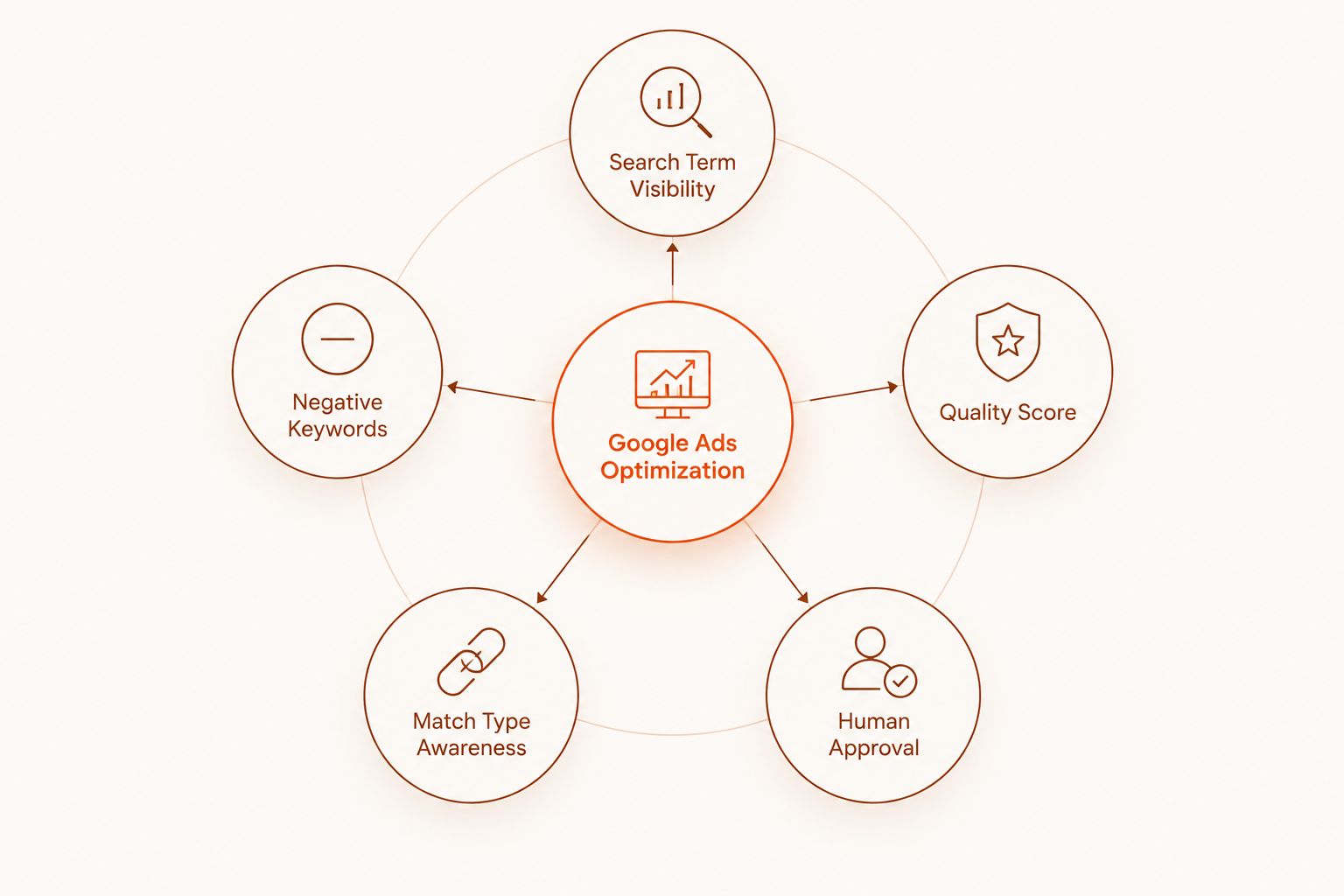
- Search term visibility — does it surface the search terms report automatically, or do you have to pull it yourself?
- Negative keyword handling — does it flag or add negative keywords, or just tell you they exist?
- Quality Score tracking — Quality Score runs on a 1-10 scale; a tool that ignores it is ignoring half your cost-per-click.
- Match type awareness — exact, phrase, and broad are the three match types, and broad without guardrails is where budgets leak.
- Human approval step — does a change go live automatically, or do you approve it first?
- Built for solo operators or agencies — a tool sized for a 40-account agency is overkill for one small business account.
Best google ads optimization tools in 2026 — at a glance
| Tool | Best for | Standout feature | Key limitation |
|---|---|---|---|
| Admiral | Small businesses replacing an agency | AI-built campaigns with human-approval step before changes go live | Not built for agencies managing dozens of client accounts |
| Google Ads Editor | Free bulk offline edits | Mass edits across campaigns without touching the live account until you upload | No automation, no alerts, no AI — pure manual tool |
| Optmyzr | Agencies with many accounts | Rule-based bid automation and cross-account Quality Score tracking | Overkill and complex for a single small business account |
| Adalysis | Automated account audits | Flags wasted spend from the search terms report and runs ad copy tests | Audit-focused — doesn't build campaigns from scratch |
| WordStream | Beginners wanting a guided grade | Account grader plus managed reporting dashboards | Less useful once you already know your account's weak spots |
| Semrush | Pre-launch keyword research | Competitive keyword gap analysis before you write a single ad | Doesn't touch your live Google Ads account at all |
| Skai | Enterprise cross-channel budgets | Manages Google, Meta, and other channels from one enterprise dashboard | Built for large ad spend, not a single-channel small business |
1. Admiral: best google ads optimization tool for small businesses without an agency
Admiral audits an existing Google Ads account, flags what's broken — wasted spend on search partners, missing negative keywords, low Quality Score keywords — and builds a plan to fix it. Changes go through an approval step before they touch the live account, so nothing gets edited without a sign-off. It's built specifically for small business owners who want the mechanics an agency would run, without the retainer.
Admiral pros:
- Flags negative keyword gaps and search partner waste automatically
- Every recommended fix is explained in plain terms before you approve it
- Manages both Google Ads and Meta campaigns from one place
- No agency contract or retainer required to get started
Admiral cons:
- Not built for agencies managing dozens of client accounts at once
- Newer than incumbents like Optmyzr, so the automation rule library is still growing
Best for: a single small business owner who wants Google Ads managed and explained, not just reported on.
Verdict: Buy if you're running your own account and don't want to learn Quality Score mechanics from scratch.
See what's wasting your ad spend
Get your Google Ads account audited before you spend another dollar.
2. Google Ads Editor: best google ads optimization tool for free bulk edits
Google Ads Editor is Google's own free desktop application for making offline changes across campaigns, then uploading them in bulk. It's the tool agencies used before AI platforms existed, and it still has a place for anyone comfortable making manual changes.
Google Ads Editor pros:
- Free, with no account limits
- Works offline — draft changes without touching the live account
- Handles bulk edits across hundreds of ad groups fast
Google Ads Editor cons:
- No automation, no alerts, no AI recommendations of any kind
- You have to know what to fix before it can help you fix it
- Zero reporting layer beyond what's already in the Google Ads interface
Best for: advertisers who already know exactly what needs changing and just want to move fast.
Verdict: Buy as a free companion tool — never as your only optimization strategy.
3. Optmyzr: best google ads optimization tool for agencies managing many accounts
Optmyzr is PPC management software built around rule-based bid automation and cross-account Quality Score tracking. It's a fixture in the agency world because it scales across dozens of client accounts from one dashboard.
Optmyzr pros:
- Rule-based automation for bids and budget pacing
- Quality Score tracking across every managed account at once
- Built for agencies, so multi-account reporting is a core feature, not an afterthought
Optmyzr cons:
- Complexity that a single small business account doesn't need
- Steeper learning curve than a single-account tool
Best for: agencies or in-house teams juggling more than a handful of Google Ads accounts.
Verdict: Buy if you manage multiple accounts. Skip if you're running one small business account solo.
4. Adalysis: best google ads optimization tool for automated account audits
Adalysis runs continuous audits against your account and flags wasted spend directly from the search terms report — the list of actual searches that triggered your ads. It also automates ad copy testing so you're not guessing which headline wins.
Adalysis pros:
- Automated audits catch issues between manual check-ins
- Ad copy testing runs without you setting up split tests by hand
- Strong at surfacing search terms report waste specifically
Adalysis cons:
- Audit and testing focused — it doesn't build campaigns from a blank account
- Best value comes with accounts that already have some spend history
Best for: advertisers who already have a running account and want a second set of eyes on it.
Verdict: Hold if your account is brand new with no spend history yet.
5. WordStream: best google ads optimization tool for a first-time account grade
WordStream is known for its free Google Ads account grader, plus managed reporting dashboards aimed at small business advertisers who want a plain-language summary of account health.
WordStream pros:
- Free grading tool gives a quick first read on account health
- Dashboards are built for non-specialists, not PPC veterans
- Good starting point before committing to a paid tool
WordStream cons:
- Less useful once you already know your account's specific weak spots
- Grading is a snapshot, not ongoing management
Best for: someone who has never audited their Google Ads account and wants a baseline first.
Verdict: Buy the free grade as a first step, then move to a management tool.
6. Semrush: best google ads optimization tool for pre-launch keyword research
Semrush is a competitive research platform, not a bid manager. Its keyword gap analysis shows which terms competitors bid on that you don't, which matters most before you build a campaign, not after.
Semrush pros:
- Strong competitive keyword gap analysis
- Useful for building an initial keyword list before campaign setup
- Works across SEO and paid research from one login
Semrush cons:
- Doesn't touch your live Google Ads account at all
- No bid automation, no Quality Score tracking, no search term monitoring
Best for: research before launch, not management after launch.
Verdict: Buy as a research layer. Skip if you're looking for a management tool.
7. Skai: best google ads optimization tool for enterprise cross-channel budgets
Skai is an enterprise-grade platform for managing ad spend across Google, Meta, and other channels from one dashboard, built for advertisers running large, multi-channel budgets.
Skai pros:
- Cross-channel budget management in one place
- Built for scale across many campaigns and channels at once
Skai cons:
- Built for large ad spend, not a single-channel small business account
- Overkill for anyone running Google Ads alone
Best for: enterprise advertisers running budgets across multiple platforms simultaneously.
Verdict: Skip unless you're already managing spend across three or more ad platforms.
How we ranked these google ads optimization tools
Every tool above got measured against the same five criteria: search term visibility, negative keyword handling, Quality Score tracking, match type awareness, and whether a human approves changes before they go live. Tools that only report data (Semrush, Google Ads Editor) rank on research and bulk-edit strength. Tools that touch the live account (Admiral, Optmyzr, Adalysis) rank on how much of the fix they actually automate versus flag. The full comparison — including feature-by-feature scoring — runs in the best 7 AI Google Ads management tools for small businesses breakdown.
Which google ads optimization tool should you choose in 2026?
If you're a small business owner running one account without an agency, Admiral is the default pick — it audits, builds, and manages campaigns with an approval step so you stay in control. If you already run a large agency book of business, Optmyzr's cross-account automation makes more sense. If you just need to make bulk edits fast and for free, Google Ads Editor still does that job in 2026 the same way it did a decade ago.
Don't buy a research tool expecting it to manage your account, and don't buy an enterprise cross-channel platform for one Google Ads account. Match the tool to the job, not the reputation.
FAQ
What's the best google ads optimization tool for small businesses in 2026?
Admiral is built specifically for small business owners who want Google Ads and Meta campaigns audited and managed without hiring an agency. It flags issues like wasted search partner spend and missing negative keywords, then routes fixes through an approval step.
Is Google Ads Editor free in 2026?
Yes, Google Ads Editor is Google's own free desktop tool for making offline, bulk changes to campaigns. It has no automation or AI recommendations built in — it just speeds up manual edits.
What is a negative keyword and why does it matter for optimization?
A negative keyword tells Google never to show your ad for a specific search. Missing negative keywords is one of the most common sources of wasted spend in an unoptimized account.
Is Optmyzr better than Admiral?
Optmyzr is built for agencies managing many client accounts with rule-based bid automation. Admiral is built for a single small business owner who wants campaigns audited and managed without an agency. They serve different account sizes.
Do I need an agency if I use an AI google ads optimization tool?
No. Platforms like Admiral are built to replace the manual work an agency would do — auditing the account, flagging waste, and building fixes — with a human approval step before anything goes live.
What does Quality Score mean and why should an optimization tool track it?
Quality Score runs on a 1-10 scale and measures how relevant your ad and landing page are to a keyword. A low score raises your cost per click, so a tool that ignores it is missing a direct cost driver.
Are search partners worth keeping on in 2026?
Search partners are other sites that show Google Search ads and are on by default in most campaigns. They're worth testing, not assuming — a tool that flags search partner performance separately from Google.com results is doing real optimization work.
What's the difference between exact, phrase, and broad match types?
These are the three match types Google offers: exact match shows your ad for close variants of a specific term, phrase match allows more variation, and broad match gives Google the most room to match loosely. Broad match without negative keyword coverage is the most common source of wasted spend.
One last thing
Search partners are turned on by default in most Google Ads accounts in 2026, and few small business owners have ever checked what percentage of their spend goes there versus Google.com itself. Before adding any tool to this list to your stack, pull your own search terms report and see how much of your budget already went somewhere you never chose.