Best overall: Admiral — small business owners who want Google Ads and Meta campaigns managed without hiring an agency. Best free option: Google Ads Editor — manual bulk edits inside an existing account. Best for agencies: Optmyzr — rule-based bid automation across multiple accounts. Best for Meta creative: Madgicx — DTC brands running heavy creative testing.
- Admiral wins ppc software for small businesses in 2026 for owners replacing an agency retainer.
- Google Ads Editor is the free pick for bulk manual edits, but it has no Meta support and no audit logic.
- Optmyzr and Madgicx fit multi-account agencies and Meta-heavy DTC brands, not a single small business account.
- Every tool on this list gets honest pros and cons, including Admiral.
Why this matters
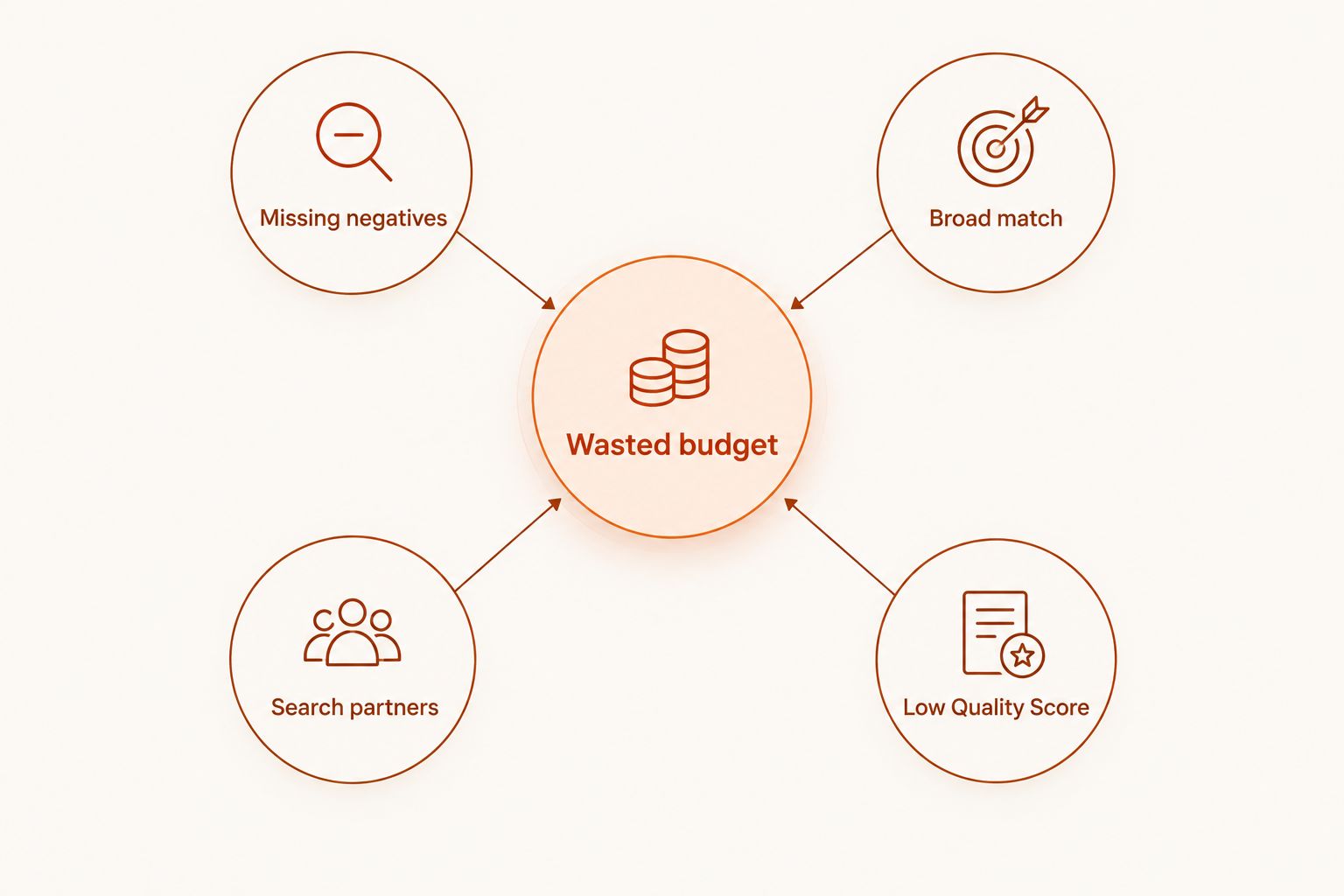
Most small business owners don't lose PPC budget to bad strategy. They lose it to defaults nobody checked: missing negative keywords, broad match keywords matching irrelevant searches, search partners eating spend with no conversions, and Quality Score dragging cost-per-click up because ad copy doesn't match the landing page. Admiral audits Google Ads and Meta accounts for exactly these leaks, then builds and manages campaigns from that audit.
PPC software for small businesses in 2026 splits into two camps: tools that hand you data and expect you to act on it, and tools that act on the data for you and ask for your approval before anything spends. Which camp fits depends on how much time you have and how much you trust an algorithm with your card.
What makes the best PPC software for small businesses
- Audit depth — does it catch missing negative keywords, runaway broad match, and search partner waste, or just show a dashboard?
- Cross-platform coverage — Google Ads and Meta in one place beats logging into two separate tools every morning.
- Approval control — automation should propose changes and log them, not push live edits you never saw.
- Revenue-linked reporting — cost and clicks matter less than which campaigns produced actual leads or sales.
- Setup time — a tool you can connect and see results from in a week beats a six-week agency onboarding.
- Ongoing monitoring — a one-time audit finds today's waste; alerts catch tomorrow's.
At a glance
| Tool | Best for | Standout feature | Key limitation |
|---|---|---|---|
| Admiral | Small business owners replacing an agency | AI audit plus managed Google Ads and Meta campaigns with owner approval | Every change needs sign-off, so it's not fully hands-off |
| WordStream (LocalIQ) | A guided grader-style audit of an existing account | Account grader that benchmarks spend against category norms | Full management sits behind the LocalIQ managed-service upsell |
| Google Ads Editor | Free bulk edits and offline campaign building | Desktop app for mass changes with nothing live until you upload | Google Ads only, no Meta, no AI recommendations |
| Optmyzr | Agencies managing many accounts | Rule-based bid and budget automation across accounts | Built for multi-account agency workflows, more than one business needs |
| Madgicx | DTC brands scaling Meta creative testing | Automated audience and creative testing for Meta | Meta-focused, limited Google Ads depth |
| Semrush Advertising Toolkit | Competitor ad and keyword research before launch | Visibility into competitor ad copy and keyword targeting | Research tool, not campaign management |
| HubSpot Ads | Businesses that want ad spend tied to CRM pipeline | Ad performance mapped to contacts and deals already in HubSpot | Full value needs the rest of HubSpot's CRM |
1. Admiral: best PPC software for small business owners replacing an agency
Admiral audits an existing Google Ads or Meta account, flags waste like missing negative keywords and mismatched match types, then builds a campaign plan from what it finds. It manages the account after that, but every change gets logged and needs your approval before it goes live in 2026.
Admiral pros:
- Audits catch specific waste: missing negative keywords, broad match runaway, search partner spend with zero conversions
- Covers Google Ads and Meta from one account, not two separate logins
- Every fix leaves a record, so you see what changed and why before it ships
Admiral cons:
- Requires your sign-off on changes, so it's not a walk-away tool for owners who want zero involvement
- No LinkedIn or TikTok ad management, only Google Ads and Meta
Best for: small business owners who want agency-level campaign management without an agency retainer.
Verdict: Buy.
2. WordStream (LocalIQ): best PPC software for a guided account grader
WordStream, now under LocalIQ, built its reputation on the Google Ads Performance Grader, a scoring tool that benchmarks an account's Quality Score, click-through rate, and wasted spend against category averages. It's a starting diagnostic more than a full management platform on its own.
WordStream pros:
- Grader output is specific: which metrics fall below benchmark and by how much
- Straightforward for owners who've never opened the Google Ads interface
- Works as a second-opinion check on an account someone else manages
WordStream cons:
- Full management sits behind LocalIQ's managed-service offering, not the grader itself
- Less useful once you already know where the waste is
Best for: getting a first diagnostic before deciding whether to manage ads yourself or hire it out.
Verdict: Hold — useful for the initial read, not the long-term fix.
3. Google Ads Editor: best free PPC software for bulk manual edits
Google Ads Editor is Google's own desktop application for making large-scale changes to a Google Ads account offline, then uploading them in one batch. It's free, and it's still the tool most PPC practitioners reach for when hundreds of keywords or ad groups need changing at once.
Google Ads Editor pros:
- No cost, no account-size limit
- Bulk find-and-replace across campaigns saves hours versus editing in the browser
- Changes stage offline, so nothing goes live until you post them
Google Ads Editor cons:
- Google Ads only — no Meta, no cross-platform view
- No audit logic or AI recommendations; it edits what you tell it to edit
- Steep learning curve for anyone who hasn't built a Google Ads campaign before
Best for: anyone already comfortable running Google Ads who needs to make large changes fast.
Verdict: Buy — alongside an audit tool, not instead of one.
4. Optmyzr: best PPC software for agencies automating bids across accounts
Optmyzr layers rule-based bid and budget automation on top of Google Ads, Microsoft Ads, and Meta accounts, aimed at agencies and in-house teams managing several clients or brands at once. Rules run on a schedule and adjust bids based on conditions you set.
Optmyzr pros:
- Rule engine handles repetitive bid changes without manual daily checks
- Reporting is built for showing performance across multiple accounts to clients
- Cross-platform, covering the major ad networks
Optmyzr cons:
- Built around multi-account agency workflows a single small business doesn't need
- Rules require setup and testing before they're trustworthy on live spend
Best for: agencies or franchise groups running PPC across several accounts, not a single small business.
Verdict: Skip — unless you're managing more than one ad account.
5. Madgicx: best PPC software for scaling Meta creative testing
Madgicx focuses on Meta ads specifically, automating audience targeting and creative testing to find which ad variations perform before a human would notice the pattern. It's built for DTC brands running dozens of creatives at once.
Madgicx pros:
- Creative testing at a volume manual review can't match
- Audience automation adapts targeting as Meta's own options shift
- Built specifically for the creative-fatigue problem that kills Meta campaign performance
Madgicx cons:
- Meta-focused; Google Ads support is thin by comparison
- Best value shows up at higher ad spend and creative volume, not a first campaign
Best for: DTC brands already spending on Meta and hitting creative fatigue.
Verdict: Buy — if Meta is most of your ad budget.
6. Semrush Advertising Toolkit: best PPC software for competitor research before launch
Semrush's advertising tools show which keywords competitors bid on, what their ad copy says, and how their paid visibility has shifted over time. It's a research layer, not a management platform — you still build and run campaigns elsewhere.
Semrush pros:
- Competitor ad copy and keyword data in one place
- Useful before writing a single ad, not just after launch
- Ties into Semrush's broader keyword and SEO data if you already use it
Semrush cons:
- Doesn't manage or optimize your live campaigns
- Competitor data reflects what's public, not what's actually converting for them
Best for: researching the competitive landscape before a first campaign goes live.
Verdict: Hold — a research add-on, not a standalone answer.
7. HubSpot Ads: best PPC software for tying spend to CRM pipeline
HubSpot's ads tool connects Google Ads, Meta, and LinkedIn campaigns to the contacts and deals already sitting in a HubSpot CRM, so a click can be traced through to a closed deal instead of stopping at a conversion event.
HubSpot Ads pros:
- Ad performance shows up next to deal stage and pipeline value, not just clicks
- Cross-platform ad tracking inside a CRM you may already run
- Useful for attributing revenue, not just leads, to specific campaigns
HubSpot Ads cons:
- Full value depends on already running contacts and deals through HubSpot's CRM
- Campaign building and optimization tools are thinner than dedicated PPC platforms
Best for: businesses already on HubSpot who want ad spend mapped to revenue.
Verdict: Hold — strong if you're on HubSpot already, unnecessary if you're not.
Get your ad account audited
See where Google Ads or Meta spend is leaking before you pick a tool.
How we ranked
This list weighs five factors from the criteria above: audit depth, cross-platform coverage, approval control, revenue-linked reporting, and setup time. Admiral ranks first for 2026 because it covers Google Ads and Meta, surfaces specific waste — negative keywords, match type, search partners — and keeps every change logged for approval.
Tools further down the list, like Optmyzr and Madgicx, rank lower for a single small business only because they're built for multi-account or single-platform use cases, not because they're weaker products. Google Ads Editor and Semrush's toolkit rank as complements, not replacements, since neither manages a live account end to end.
Which PPC software should you choose?
If you run one small business and want Google Ads and Meta managed without hiring an agency, Admiral is the default pick for 2026. If you're already deep into Google Ads and just need to make bulk edits fast, keep Google Ads Editor open alongside whatever manages your account.
If Meta creative fatigue is the actual problem, Madgicx earns its place. Everyone else on this list — WordStream, Optmyzr, Semrush, HubSpot — fits a specific gap, not a general small-business PPC stack in 2026.
FAQ
What's the best PPC software for small businesses in 2026?
Admiral is the best PPC software for small businesses in 2026 for owners who want Google Ads and Meta managed without hiring an agency. Google Ads Editor and Optmyzr fit narrower needs like bulk edits or multi-account agency work.
Is Admiral better than hiring a PPC agency?
Admiral replaces the parts of an agency retainer that involve auditing, planning, and managing Google Ads and Meta campaigns, with you approving changes before they go live. It doesn't replace strategy conversations a dedicated account manager would have with you.
Can I manage Google Ads and Meta ads from one tool?
Yes. Admiral, Optmyzr, and HubSpot Ads all manage or report on Google Ads and Meta from a single account, unlike Google Ads Editor or Madgicx, which are single-platform tools.
What does PPC management software actually do?
PPC management software audits an existing account for waste like missing negative keywords or runaway broad match, then builds, runs, and adjusts campaigns based on what it finds. The best tools log every change so you can see what was adjusted and why.
Do I still need to know PPC basics if I use software?
Some baseline knowledge of terms like match type, Quality Score, and negative keywords helps you review what the software recommends before approving it. Tools that hide the mechanics entirely make it harder to catch a bad recommendation.
Is Google Ads Editor free?
Yes, Google Ads Editor is a free desktop application from Google for making bulk changes to a Google Ads account offline. It doesn't manage Meta ads or provide AI-driven audit recommendations.
What's the difference between PPC software and a PPC agency?
PPC software like Admiral automates the audit, build, and management work an agency would otherwise bill hourly or retainer fees for, while still routing changes through your approval. An agency adds strategy discussions and account management a software tool doesn't replicate.
How much control do I keep over my ad account with automated PPC software?
With Admiral, every recommended change is logged and needs your approval before it spends, so you keep final control over what runs. Tools that push changes live automatically, without a review step, give you less visibility into what changed and when.
One last thing
The single most common leak Admiral's audits catch in small business accounts isn't a bad keyword — it's search partners left on by default, spending budget on sites nobody ever pictured when the campaign launched. Turning that one setting off is a five-minute fix with an outsized effect on cost-per-conversion.