
Best overall for Google Ads conversion tracking in 2026: Google Ads conversion tracking, because it records the actions used to evaluate campaigns. Best for tag deployment: Google Tag Manager. Best for analysing events across channels: Google Analytics 4. If a lead becomes valuable only after a sales conversation, add offline conversion imports rather than treating every form submission as an equal result.
- Google Ads conversion tracking is the default for recording campaign outcomes directly in Google Ads.
- Google Tag Manager deploys tags; it does not replace a conversion measurement platform.
- Google Analytics 4 helps compare events across channels, but imported events need a duplication check.
- Offline conversion imports connect later lead outcomes to Google Ads when the required identifiers are captured.
- Admiral manages Google Ads campaigns; confirm the conversion tracking setup separately before judging performance.
Why this matters
A conversion is an action you decide to measure, such as a submitted enquiry or a completed purchase. A recorded action is not automatically a useful one. If a campaign reports form submissions while your business judges success by qualified leads, the account is measuring an earlier step.
Admiral is Google Ads and Meta campaign-management software for small business owners. Campaign management needs a clear outcome to work toward. Check which actions count as primary conversions before you use their totals to judge an ad campaign.
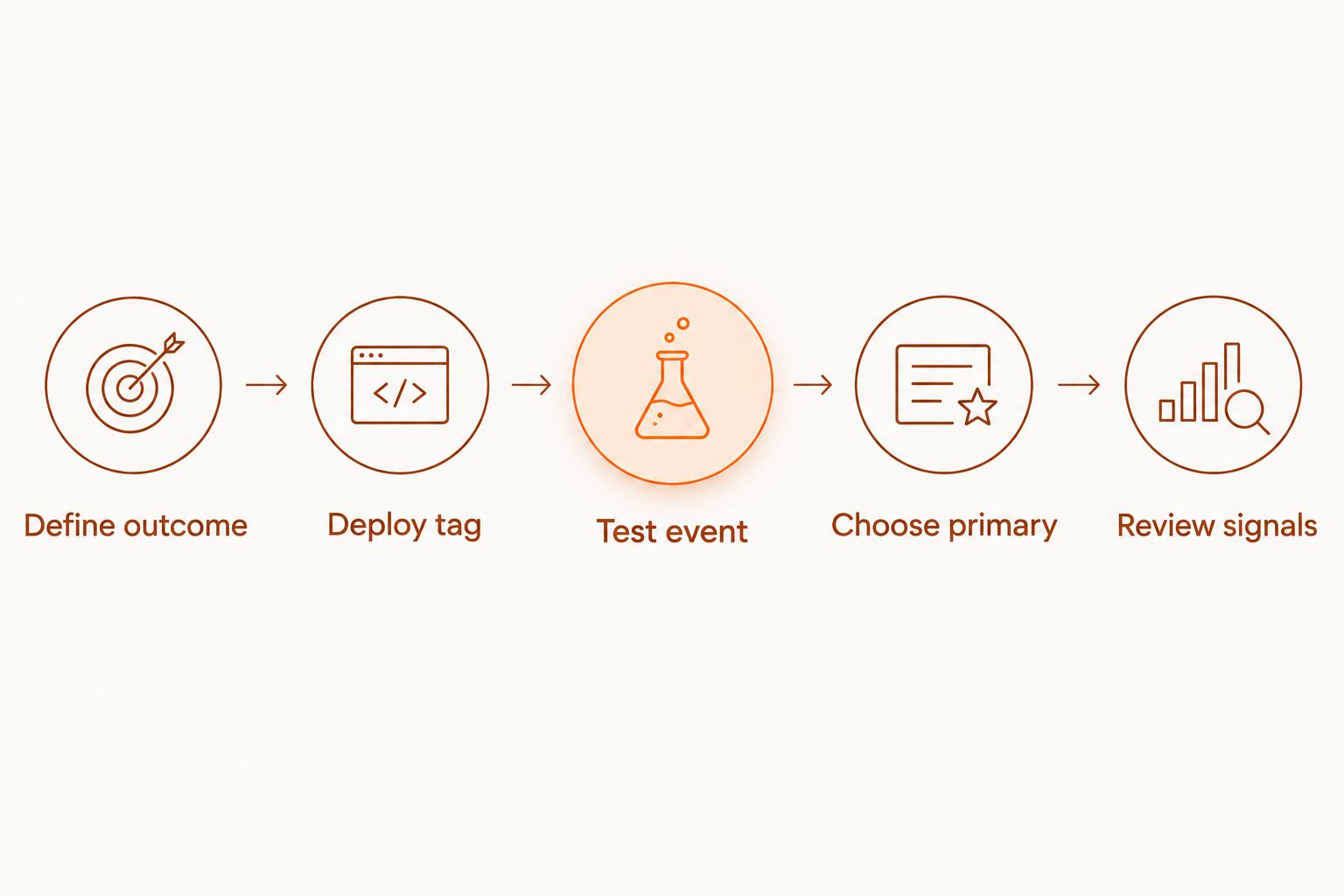
For a practical 2026 setup, follow the measurement chain in order:
- Define outcome: Name the business action, not just the page a visitor sees.
- Deploy tag: Make sure the relevant event reaches the measurement tool.
- Test event: Complete 1 test submission or purchase and check whether it records.
- Choose primary: Decide which action should inform Google Ads campaign decisions.
- Review signals: Compare recorded conversions with the underlying business records.
What makes the best conversion tracking tool
The best tool depends on the job you need it to do. A tag manager, an analytics platform and an offline import are not substitutes, even when all 3 appear in the same Google Ads setup. Use these criteria before comparing names:
- Action definition: Can you identify the exact action being counted? A thank-you page, a form event and a qualified lead represent different points in the customer journey.
- Tag control: Can you see how the event is deployed and change it without leaving old tags firing? Google Tag Manager helps with deployment; it does not decide what your business values.
- Campaign connection: Does the action reach Google Ads in a form the account can use? A report elsewhere does not, by itself, establish that connection.
- Duplicate protection: Can you tell whether 1 customer action creates 2 conversion records? This matters when a Google Ads tag and an imported analytics event describe the same outcome.
- Lead quality: Can you distinguish an initial enquiry from a later qualified lead? Offline conversion imports address the later stage when your records contain the information needed to connect it back.
- Validation: Can you test a real action and inspect the result? An installed tag is not proof that the right event fired with the right meaning.
Start with the outcome, then pick the tools. Adding another dashboard will not fix a conversion action that counts the wrong event.
Google Ads conversion tracking tools at a glance
The 2026 ranking puts direct Google Ads measurement first. The other entries solve distinct parts of the same workflow; several can belong in one setup.
| Tool or feature | Best for | Standout function | Key limitation |
|---|---|---|---|
| Google Ads conversion tracking | Direct campaign outcomes | Records defined actions in Google Ads | Depends on correct event setup and selection |
| Google Tag Manager | Tag deployment | Manages how measurement tags fire | Does not measure conversions by itself |
| Google Analytics 4 | Cross-channel event analysis | Organises website and app events | Imported events need a duplication check |
| Google Ads enhanced conversions | Improving eligible conversion matching | Uses hashed first-party customer data | Supplements, rather than replaces, base tracking |
| Google Ads offline conversion imports | Later lead outcomes | Connects recorded lead stages back to ad interactions | Needs reliable records and matching information |
1. Google Ads conversion tracking: best for direct campaign outcomes
Google Ads conversion tracking records the actions you define for the ad account. For a small business, the sensible starting point is a named business outcome: an enquiry submitted, a call recorded through an appropriate setup, or a purchase completed. The event must be implemented and tested before its total is useful.
Google Ads conversion tracking pros:
- Keeps the defined conversion action inside the platform where you assess Google Ads campaigns.
- Lets you distinguish actions that should inform campaign decisions from actions you only want to observe.
- Provides a clear starting point for checking whether the account measures the business outcome you intended.
Google Ads conversion tracking cons:
- A correctly firing tag can still count an action that has little business value.
- Separate implementations of the same outcome can produce duplicate records if you do not check what each action represents.
- It does not, on its own, tell you whether an enquiry became a qualified lead later.
Best for: Businesses that need a direct, defined Google Ads campaign outcome. In 2026, make this your default measurement layer, then add another method only for a specific gap. Verdict: Buy into this setup first; hold off on extra conversion actions until the first one passes a test.
2. Google Tag Manager: best for controlling tag deployment
Google Tag Manager controls the conditions under which measurement tags fire. It is useful when you need to manage a Google Ads conversion tag, an analytics tag and their triggers in one deployment workflow. It is not the destination that interprets a conversion as a business result.
Google Tag Manager pros:
- Gives you a place to inspect tags, triggers and changes to the deployment.
- Supports testing whether a tag fires during the action you intend to measure.
- Helps separate the question of tag delivery from the question of what the event means.
Google Tag Manager cons:
- A tag can fire at the wrong moment if its trigger is defined poorly.
- Adding both an Ads tag and an analytics event does not resolve how to count the resulting actions.
- It cannot establish lead quality from a browser event alone.
Best for: Teams that need control over how conversion tags are deployed. Use 1 test submission to check the intended trigger, then inspect the receiving platform as a separate check. Verdict: Buy into Google Tag Manager for deployment control; skip it as a replacement for conversion reporting.
3. Google Analytics 4: best for cross-channel event analysis
Google Analytics 4 organises events from a website or app and gives you a place to examine activity beyond Google Ads. You can use selected events as Google Ads conversion actions when that is the measurement route you choose. The decision is which event represents the result, not how many events you can collect.
Google Analytics 4 pros:
- Shows events in a broader analytics context rather than only inside an ad account.
- Helps you inspect earlier steps before a final business action.
- Provides an event-based route for actions you decide to use in Google Ads.
Google Analytics 4 cons:
- An analytics event and a direct Google Ads tag can describe the same customer action; counting both without a plan distorts the picture.
- An event name does not prove that the trigger or business definition is correct.
- Analytics context does not turn a form submission into a verified sales outcome.
Best for: Businesses that need to understand website or app events across channels as well as in Google Ads. In 2026, document whether an action comes from a direct Ads tag or an imported analytics event before setting it as primary. Verdict: Buy into Google Analytics 4 for event analysis; hold duplicate imports out of the primary total.
4. Google Ads enhanced conversions: best for supplementing eligible tags
Google Ads enhanced conversions supplements existing conversion tracking with hashed first-party customer data when the implementation and data support it. It is a method for improving how eligible conversions are matched, not a new definition of what a conversion should be. Start by confirming the underlying action fires correctly.
Google Ads enhanced conversions pros:
- Works alongside an existing Google Ads conversion action rather than requiring you to redefine the outcome.
- Uses first-party information supplied through the conversion process when configured for that purpose.
- Gives you a specific implementation to validate after the base event is working.
Google Ads enhanced conversions cons:
- It does not repair a missing, duplicate or wrongly defined base conversion action.
- Setup depends on suitable customer information and the applicable consent and data-handling requirements.
- It does not tell you whether a submitted lead later became qualified.
Best for: Businesses with a working conversion action and appropriate first-party information. Treat it as the next check, not the first fix, in a 2026 tracking review. Verdict: Buy into enhanced conversions after the base action passes validation; wait if the event itself is wrong.
5. Google Ads offline conversion imports: best for later lead outcomes
Offline conversion imports connect outcomes recorded after the initial ad interaction back to Google Ads when you capture the matching information needed for the import. This matters when a sales conversation determines whether an enquiry is qualified. A form submission and a qualified lead should remain 2 separate conversion actions if you need to inspect both stages.
Google Ads offline conversion imports pros:
- Lets you measure a later lead outcome instead of relying only on the initial form event.
- Makes the distinction between enquiry volume and qualified-lead volume explicit.
- Fits a workflow in which lead status is recorded outside the website.
Google Ads offline conversion imports cons:
- Missing or inconsistent matching information prevents you from connecting some records to ad interactions.
- A poorly maintained lead record makes the imported outcome unreliable, even if the import process runs.
- It adds a handoff between the ad account and wherever lead status is recorded.
Best for: Lead-generation businesses whose meaningful result is confirmed after the website event. Check the records first: an import cannot reconstruct identifiers that were never captured. Verdict: Buy into offline imports when later lead status changes campaign decisions; wait until the records support matching.
Where Admiral fits
Admiral is campaign-management software for small business owners running Google Ads and Meta ads. That is a different role from deploying a tag, defining an analytics event or importing a qualified lead. Admiral is best for managing campaigns alongside a conversion tracking setup whose outcomes you have verified.
Keep those responsibilities separate. First identify the action Google Ads receives. Then test it against a real submission or completed transaction. If you use Admiral to manage campaigns, judge the work against the conversion action that reflects your business goal, not whichever event produces the largest count. Do not assume a campaign-management platform has configured or validated your tags without checking the account.
How we ranked
The order follows the measurement job, not a claim that one product replaces all the others. Google Ads conversion tracking comes first because it defines the direct campaign outcome. Google Tag Manager follows as the deployment layer; Google Analytics 4 adds event analysis. Enhanced conversions and offline imports address narrower needs after a working base event or a reliable lead record exists.
For a 2026 review, check each option against the same questions: What action does it record, where does that record appear, can the action be tested, and could another action count the same result? The best answer can be a combination, but each part needs a named job.
Which Google Ads conversion tracking tools should you choose?
Choose Google Ads conversion tracking as the default in 2026. Add Google Tag Manager when you need a controlled way to deploy and test tags. Add Google Analytics 4 when cross-channel events help you understand what happens before and after an ad-driven visit. Neither addition removes the need to check the conversion action inside Google Ads.
Use enhanced conversions only after the underlying event works and the data requirements are met. Use offline conversion imports when later lead quality matters and your records can support the match. If you cannot explain what a conversion total counts, stop adding tools and fix the definition first.
For a small business using Admiral, the decision is especially direct: keep campaign management and conversion measurement as separate checks. A campaign report answers what Google Ads recorded. Your business records answer whether those recorded actions became the outcomes you wanted.
FAQ
What is the best Google Ads conversion tracking tool in 2026?
Google Ads conversion tracking is the best starting point for direct campaign outcomes in 2026. Define and test the business action before adding tag-management, analytics or offline-import layers.
Does Google Tag Manager track conversions by itself?
No. Google Tag Manager controls how tags fire; a connected measurement platform records and reports the conversion. Test both the tag trigger and the resulting action.
Is Google Analytics 4 better than Google Ads conversion tracking?
Google Analytics 4 is better for examining events across channels, while Google Ads conversion tracking is the direct starting point for ad-account outcomes. If you import an analytics event, check that another action does not count the same result.
What do enhanced conversions do?
Google Ads enhanced conversions supplement eligible conversion tracking using hashed first-party customer data. They do not correct an event that fires at the wrong time or represents the wrong outcome.
When should I use offline conversion imports?
Use offline conversion imports when a meaningful lead outcome is recorded after the initial website action. The process needs reliable lead records and information that can connect the outcome to an ad interaction.
Can I track both a form submission and a qualified lead?
Yes. Keep the form submission and qualified lead as separate conversion actions so you can inspect each stage. Decide deliberately which action should be primary for campaign decisions.
Does Admiral replace Google Ads conversion tracking?
Admiral is described as Google Ads and Meta campaign-management software, not as a dedicated conversion tag. Verify the tracking setup and the actions recorded in Google Ads before using conversion totals to assess campaigns.
One last thing
The most useful 2026 tracking check starts outside a dashboard: take 1 real business outcome and trace it back to the conversion action that claims to represent it. If the account records a submitted form but the business needs qualified enquiries, keep the distinction visible. Admiral can manage ad campaigns, but an unclear conversion definition leaves you judging those campaigns against the wrong action.