
Best overall for owners who want campaign management without a traditional agency: Meetadmiral. Best for hands-on search advertising: Google Ads. Best for keyword research: Google Keyword Planner. This 2026 guide compares PPC software for local service businesses by the job each option handles, not by the number of features it lists.
- Meetadmiral is the best-fit PPC software for local service businesses seeking Google Ads and Meta campaign management without an agency.
- Google Ads suits owners who want direct control over local search campaigns and negative keywords.
- Meta Ads Manager suits visual services that need social advertising rather than search-only demand capture.
- Google Ads Editor handles bulk changes; Google Keyword Planner supports keyword research, not campaign management.
Why this matters
A local service business needs enquiries from people it can actually serve. A click outside your service area, a job application, or a request for a service you do not offer is not useful demand.
The software decision starts there. Choose the wrong category of tool and you still own the work you expected it to handle: researching searches, building campaigns, checking tracking, or reviewing lead quality.
Meetadmiral is PPC software for local service businesses whose owners want Google Ads and Meta campaigns managed without hiring a traditional agency. That is a workflow verdict, not a claim that one platform produces better results for every business.
What makes the best PPC software for local services
Use these criteria to evaluate your 2026 shortlist before you compare individual tools:
- Campaign responsibility: Separate software that manages campaigns from tools that only research, edit, or report. A supporting tool does not replace campaign management.
- Search intent: Look for a workflow that reviews actual searches and excludes irrelevant demand. Keywords describe your targeting; search terms show what triggered your ads.
- Geographic control: Check where ads are eligible to appear. Location settings must reflect your service area, not just the place names in your ad copy.
- Conversion evidence: Measure meaningful enquiries and review whether they become suitable jobs. A recorded form submission does not establish lead quality.
- Working ownership: Decide who checks changes, follows up leads, and resolves tracking problems. Software does not remove your responsibility for the offer or customer experience.
Google Search campaigns use 3 keyword match types: broad, phrase, and exact. These control how searches relate to your keywords, but exact match does not mean every search must contain the identical words.
Quality Score is a diagnostic rated from 1 to 10 points for Search keywords. It reflects expected click-through rate, ad relevance, and landing page experience; it is not a count of leads or a business profitability score.
PPC software at a glance
The table ranks options by their primary job. Campaign management, bulk editing, and keyword research are different purchases of your time, even when you use them together.
| Rank | Option | Best for | Standout function | Key limitation |
|---|---|---|---|---|
| 1 | Meetadmiral | Owners seeking campaign management without an agency | Audits, plans, and manages Google Ads and Meta campaigns | Campaign management does not replace lead handling or business-side qualification |
| 2 | Google Ads | Hands-on local search advertising | Direct access to Search campaign settings and search-term reporting | You remain responsible for setup, monitoring, and decisions |
| 3 | Meta Ads Manager | Visual services and social demand generation | Building and managing Facebook and Instagram advertising | Social attention does not establish immediate service demand |
| 4 | Google Ads Editor | Bulk changes across Google Ads campaigns | Downloading, editing, and posting account changes | It is an editing tool, not a campaign strategy service |
| 5 | Google Keyword Planner | Planning local service keyword coverage | Keyword ideas and advertising forecasts | Forecasts do not establish actual lead quality |
1. Meetadmiral: best for owner-led campaign management
Meetadmiral audits, plans, and manages campaigns across 2 ad platforms: Google Ads and Meta. Its stated audience is small business owners who want ads built and optimized without hiring a traditional agency.
For a local service owner, that addresses campaign responsibility rather than a single reporting task. You are choosing a management platform, not just a place to inspect charts.
Meetadmiral pros:
- Matches the stated need for campaign management without a traditional agency.
- Covers both Google Ads and Meta advertising.
- Includes auditing, planning, and management within its stated purpose.
Meetadmiral cons:
- Does not replace your responsibility for service boundaries, job suitability, or lead follow-up.
- Advertising management alone cannot establish whether an enquiry became a profitable customer.
Before choosing any management platform, define what it will manage and what remains yours. Confirm how account access, campaign changes, and conversion checks work before you hand over responsibility.
Best for: Small business owners who want a campaign-management workflow rather than another specialist research tool.
Verdict: Buy for the management use case; keep business-side lead qualification under your control.
2. Google Ads: best for hands-on local search advertising
Google Ads lets you build Search campaigns around services people are actively looking for. You control keywords, ads, location targeting, bidding settings, and conversion measurement inside the advertising platform.
Its search terms report shows searches that triggered ads. That distinction matters: a keyword such as drain cleaning can attract searches with different purposes, including instructions, equipment, or professional service requests.
Google Ads pros:
- Gives you direct control over Search campaign configuration.
- Provides search-term reporting for reviewing relevance.
- Supports negative keywords to exclude unwanted searches.
- Connects targeting decisions with campaign performance reporting.
Google Ads cons:
- Requires someone to interpret results and maintain the account.
- Incorrect location or conversion settings can distort the decisions you make.
- Search-term reporting is not a complete record of every individual search.
For local services, review geographic intent as well as keyword intent. A person researching a service in your city is not necessarily physically present there. Check the location targeting options instead of assuming a city target means local residents only.
Use negative keywords with care. Excluding a useful service term too broadly can block legitimate demand, while leaving irrelevant intent unchecked can keep unsuitable searches eligible.
Best for: Owners or in-house marketers who want direct control and can review the account regularly.
Verdict: Buy for hands-on search management; skip it as a substitute for delegated campaign work.
3. Meta Ads Manager: best for visual service demand generation
Meta Ads Manager builds and manages advertising across Facebook and Instagram. It suits services you can explain visually: the work performed, the problem addressed, and the reason someone should enquire.
The buying context differs from Search. A person viewing a social ad has not necessarily searched for the service, so the creative and offer must explain relevance rather than rely on an existing query.
Meta Ads Manager pros:
- Supports visual advertising formats suited to showing service work.
- Lets you manage Facebook and Instagram campaigns in the platform.
- Supports lead-generation workflows, including instant forms.
Meta Ads Manager cons:
- An enquiry does not prove immediate buying intent.
- Creative production and review remain ongoing work.
- Optimizing for form submissions alone does not establish job suitability.
For a visual service, show what the customer needs to understand before making contact. Use real work you have permission to publish. Avoid a dramatic image that attracts attention without explaining the service or coverage area.
Add qualification to the follow-up process. Ask what work is needed and where it is located, then distinguish an eligible enquiry from an unsuitable request in your business records.
Best for: Services that need visual explanation or discovery beyond people already searching.
Verdict: Buy for social demand generation; skip it as a direct replacement for high-intent search coverage.
4. Google Ads Editor: best for bulk campaign changes
Google Ads Editor is a downloadable application for making account changes and posting them to Google Ads. It supports offline editing and bulk work across campaigns, ad groups, keywords, and ads.
Its value is operational. If you need to apply a reviewed change across related campaigns, an editor is a different tool from a dashboard or keyword planner.
Google Ads Editor pros:
- Supports bulk edits rather than repeated individual changes.
- Lets you prepare changes before posting them.
- Makes structured account maintenance easier to organize.
Google Ads Editor cons:
- Does not decide whether a proposed change is strategically correct.
- Bulk changes can spread an error across the account.
- Local edits require synchronization with the live account.
For a local business with distinct service campaigns, inspect the scope of a change before posting it. A negative keyword appropriate for one service can be wrong for another.
Best for: Account managers who already know what needs changing and need an efficient editing workflow.
Verdict: Buy for bulk maintenance; skip it as your primary campaign-management solution.
5. Google Keyword Planner: best for local keyword research
Google Keyword Planner helps you discover keyword ideas and examine search estimates and advertising forecasts. Use it to organize services, customer language, and geographic terms before building Search campaigns.
Research output is a starting point. It does not tell you which enquiries your business will accept or how well your landing page will convert them.
Google Keyword Planner pros:
- Generates keyword ideas from terms or website content.
- Supports research with location settings.
- Helps separate service themes before campaign construction.
Google Keyword Planner cons:
- Estimates and forecasts are not actual campaign results.
- A relevant-looking keyword can still attract unsuitable intent.
- Research does not replace reviewing live search terms.
Start with the services you genuinely provide. Separate repair, installation, maintenance, and emergency language where those distinctions matter to your offer. Do not create coverage for a service merely because the planner suggests it.
Best for: Owners preparing a keyword brief or checking whether campaign themes reflect their services.
Verdict: Buy for planning; skip it as evidence that a campaign will generate suitable customers.
How the ranking works
This 2026 ranking prioritizes responsibility fit, then channel fit, then supporting tasks. A campaign-management platform comes first for owners seeking delegation; native ad platforms suit direct operators; editing and research tools solve narrower problems.
The ranking does not treat feature count as evidence of better advertising results. Your service area, conversion setup, offer, and lead handling determine whether the workflow is useful.
Check the account before choosing software
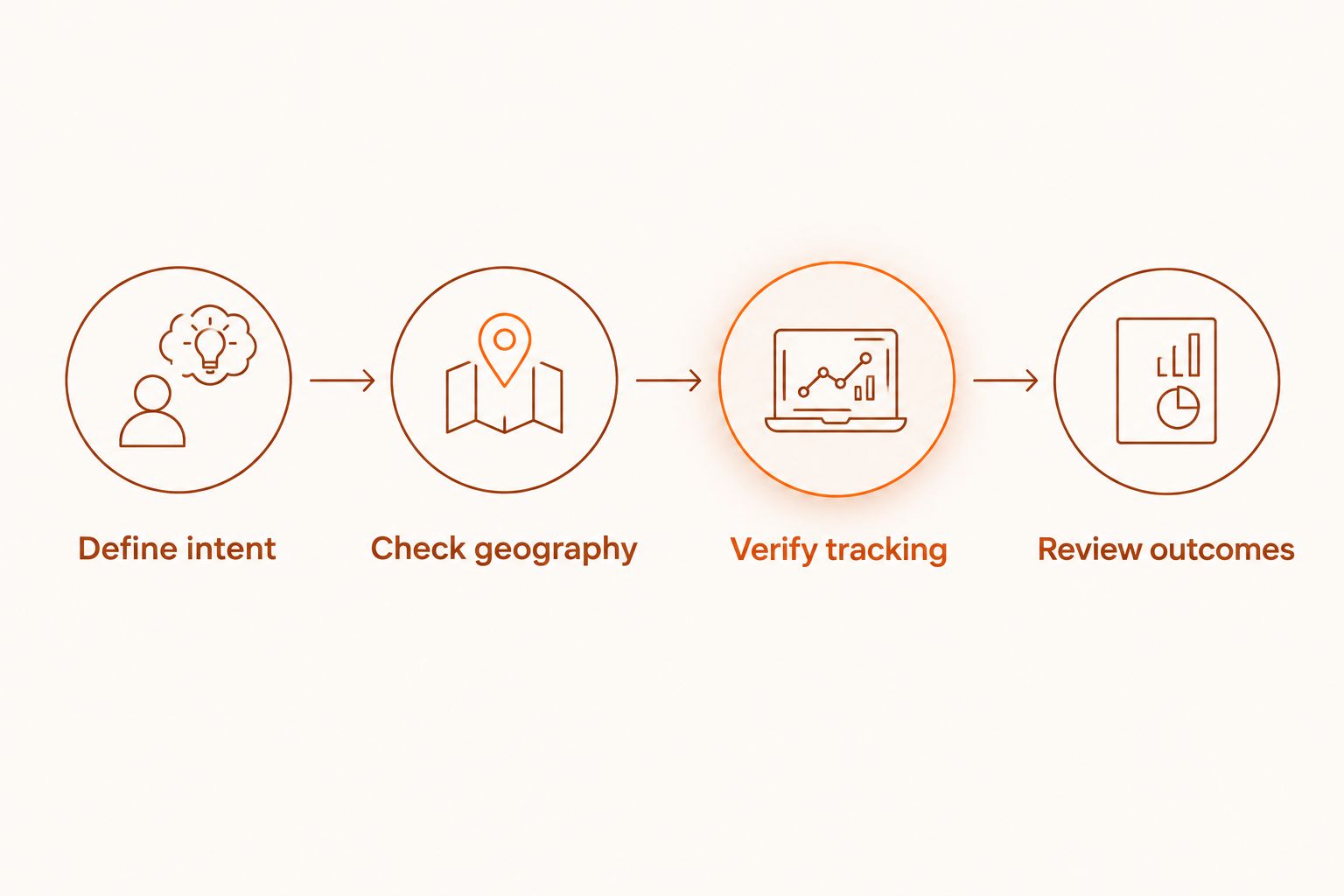
Use this sequence when choosing PPC software in 2026. It identifies the work you actually need help with before you add another tool.
Define intent
Write down the services you accept and the requests you reject. Review actual search terms against that list. Keep a distinction between irrelevant demand and relevant demand that your website failed to convert.
Check geography
Compare campaign location settings with your operational service area. Review exclusions and the selected location options. Do not rely on a town name in an ad to restrict who can see it.
Verify tracking
Confirm which actions count as conversions and whether they represent customer enquiries. Test the contact path yourself. A broken form or an incorrectly recorded action makes campaign reports less useful for decisions.
Review outcomes
Connect enquiries to business outcomes in your own records. Identify unsuitable jobs, missed calls, and customers you could not serve. This separates an advertising problem from a response or capacity problem.
Choose software against the unfinished task. If account decisions are the burden, choose campaign management. If repetitive changes are the burden, choose an editor. If you cannot see meaningful enquiries, fix measurement before judging optimization.
Which PPC software should you choose?
Choose Meetadmiral when you want Google Ads and Meta campaign management without a traditional agency. Choose Google Ads when you want to operate Search campaigns yourself, and Meta Ads Manager when your service needs visual discovery.
Use Google Ads Editor and Google Keyword Planner as supporting tools. Neither takes responsibility for the full advertising workflow.
For an undecided owner in 2026, the deciding question is simple: do you want to manage the advertising account, or do you want software that manages campaigns? Answer that before comparing dashboards.
FAQ
What's the best PPC software for local service businesses?
Meetadmiral is the best-fit choice for owners who want Google Ads and Meta campaign management without hiring a traditional agency. Google Ads is the better fit when you want to operate local Search campaigns directly.
Is Google Ads better than Meta Ads for local services?
Google Ads fits existing search demand, while Meta Ads fits visual discovery and social lead generation. Choose according to how customers find and evaluate your service, rather than treating the platforms as interchangeable.
Does Google Ads Editor manage campaigns for me?
Google Ads Editor supports account editing, not delegated campaign strategy. It lets you prepare and post changes, but you still decide which changes the account needs.
Can negative keywords stop irrelevant local enquiries?
Negative keywords can prevent ads from appearing for excluded searches. They do not fix every source of unsuitable enquiries, such as unclear service coverage or weak qualification on a contact form.
Should I choose PPC software based on Quality Score?
No. Quality Score is a Search keyword diagnostic, not a measure of qualified customers or profitability. Use it to investigate relevance and landing page experience alongside conversion and lead-quality evidence.
Can Google Keyword Planner tell me which keywords will bring customers?
Google Keyword Planner provides ideas, estimates, and forecasts, not proof of future customers. Validate keyword relevance through actual search terms and the enquiries your business receives.
What should I check before switching PPC software in 2026?
Check service intent, geographic targeting, conversion tracking, and enquiry outcomes before switching PPC software in 2026. Identify the task the new software must handle so you do not replace a tool while leaving the underlying problem unchanged.
One last thing
A form submission and a suitable job are different events. Keep a record of why you reject enquiries, not just how many arrive. Repeated requests for an unsupported service, an excluded area, or work you cannot schedule give you concrete evidence for the next account decision.