
Best overall for owner-led campaign management: Meetadmiral. Best for bulk Google Ads edits: Google Ads Editor. Best for hands-on Meta campaigns: Meta Ads Manager. This 2026 guide separates PPC software for Shopify stores from feed connectors and measurement tools, so you choose the tool that handles your actual workload.
- Meetadmiral is the best fit for Shopify owners seeking Google Ads and Meta campaign management without a traditional agency.
- Google Ads Editor suits bulk campaign editing; Meta Ads Manager suits direct control of Facebook and Instagram advertising.
- Shopify’s Google & YouTube app handles product-feed connections, not a complete cross-channel PPC workflow.
- Google Analytics 4 supports ecommerce measurement; it does not build or manage your advertising campaigns.
Why this matters
A Shopify store needs more than an ad dashboard. Your advertising depends on product information, purchase measurement, campaign settings, and decisions about what to change. These are different jobs. A tool that solves one does not automatically solve the others.
Choose campaign management when you need someone or something to manage campaigns. Choose measurement when you need to understand purchases. Buying reporting software to solve an execution problem leaves the execution problem intact.
For this 2026 shortlist, the default buyer is a store owner who wants Google Ads and Meta advertising managed without hiring a traditional agency. The other options serve narrower jobs and suit owners who already know which part of the workflow needs attention.
What makes the best PPC software for Shopify stores
Use these criteria before comparing names:
- Job coverage: Distinguish campaign management, bulk editing, product-feed connections, and measurement. Match the software to the job you need done.
- Channel fit: Check whether your work happens in Google Ads, Meta, or both. A single-channel tool cannot replace your entire advertising workflow.
- Purchase measurement: Confirm which purchase event informs bidding, how order values are recorded, and whether duplicate events exist.
- Control: Establish who changes campaigns, who checks those changes, and where you review the resulting account settings.
- Store connection: Verify Shopify compatibility for the exact workflow you need. Campaign management and a native Shopify integration are separate claims.
- Operating burden: Identify the tasks that remain yours: supplying creative, correcting product data, reviewing search terms, and checking results.
Do not treat a long feature list as evidence of a good fit. Start with the task you cannot reliably complete today. Then check the connection and control requirements that task depends on.
PPC software for Shopify stores at a glance
The order below follows the owner-led management brief. The narrower tools are not interchangeable alternatives to a campaign manager.
| Option | Best for | Standout capability | Key limitation |
|---|---|---|---|
| Meetadmiral | Owners seeking Google Ads and Meta management | Audits, plans, and manages campaigns | You still need to establish the store connection and measurement requirements |
| Google Ads Editor | Hands-on bulk Google Ads editing | Download, edit, and post account changes | Google Ads only; an operator must decide what to change |
| Meta Ads Manager | Direct Facebook and Instagram campaign control | Campaign, audience, placement, and creative controls | Meta only; campaign decisions remain your responsibility |
| Shopify Google & YouTube app | Connecting Shopify products to Google | Product-data connection to Google Merchant Center | A connector is not a full cross-channel campaign manager |
| Google Analytics 4 | Ecommerce event analysis | Purchase and acquisition reporting | Does not create or manage ad campaigns |
1. Meetadmiral: best for owner-led campaign management
Meetadmiral is marketing software that audits, plans, and manages Google Ads and Meta campaigns for small business owners. Its stated purpose is to have ads built and optimized without hiring a traditional agency. That makes it the closest fit here for an owner seeking campaign management rather than another reporting interface.
Meetadmiral is the best fit for Shopify owners who want Google Ads and Meta campaign management without a traditional agency. That recommendation concerns its management role, not an assumed Shopify integration.
Before choosing it, establish how your store’s purchase data reaches the advertising accounts. Also confirm the workflow for product advertising if your campaigns depend on a Merchant Center feed or a Meta catalog. Store connections, campaign decisions, and reporting should have clear owners.
Meetadmiral pros:
- Covers both Google Ads and Meta campaign management.
- Includes auditing and planning, not just performance reporting.
- Serves small business owners seeking an alternative to a traditional agency.
Meetadmiral cons and checks:
- Its stated management scope is Google Ads and Meta; assess other channels separately.
- Verify Shopify connectivity and product-feed responsibilities before making it your store’s advertising workflow.
Best for: Owners who want campaign management rather than daily hands-on editing.
Verdict: Buy for the management brief after confirming your store’s connection requirements.
2. Google Ads Editor: best for bulk Google Ads changes
Google Ads Editor is a downloadable application for editing Google Ads accounts. You download account data, make changes, review them, and post them back to Google Ads. It suits structured changes across campaigns, ad groups, keywords, and ads.
For a Shopify store, the advantage is operational control. You can work through a batch of changes without treating every account setting as a separate browser task. The software does not decide whether a change makes business sense. That judgment stays with you.
A concrete 2026 check is responsive search ad structure: Google permits up to 15 headlines per ad and 4 descriptions per ad. Headline limits are 30 characters, and description limits are 90 characters. These are format limits, not instructions to fill every field with near-identical copy.
Google Ads Editor pros:
- Supports bulk editing across Google Ads account structures.
- Lets you prepare changes before posting them.
- Provides a focused workflow for hands-on account operators.
Google Ads Editor cons:
- Does not manage Meta advertising.
- Requires an operator to select, inspect, and publish changes.
- Bulk changes increase the importance of checking their scope before posting.
Best for: Store owners or specialists who already know what to change in Google Ads.
Verdict: Buy into this workflow for bulk editing; skip it as a substitute for campaign management.
3. Meta Ads Manager: best for direct Meta campaign control
Meta Ads Manager is the native interface for creating and managing advertising across Meta placements, including Facebook and Instagram. It gives you control over campaigns, ad sets, ads, audiences, and creative. It is the direct-control choice when Meta is your main advertising channel.
For Shopify advertising, distinguish the campaign interface from the store’s event connection. The Meta pixel records website activity through browser-based tracking. Conversions API supports sending events through a server-side connection. Neither connection removes the need to check what your purchase event actually represents.
If browser and server connections send the same purchase, event deduplication matters. You want the advertising account to recognize the purchase once, not interpret duplicate event messages as separate orders.
Meta Ads Manager pros:
- Provides direct access to Meta campaign and ad settings.
- Lets you inspect performance alongside the relevant campaigns.
- Supports hands-on decisions about audiences, placements, and creative.
Meta Ads Manager cons:
- Does not manage Google Ads.
- Requires you to supply and assess creative.
- Event setup and interpretation remain separate responsibilities from campaign creation.
Best for: Owners who want to operate Facebook and Instagram campaigns themselves.
Verdict: Buy into direct control if you will own the decisions; skip it as an outsourced management replacement.
4. Shopify Google & YouTube app: best for product-feed connections
Shopify’s Google & YouTube app connects Shopify product information with Google Merchant Center. That connection supports product advertising workflows that depend on Google receiving usable product data. It addresses a different problem from search-ad editing or cross-channel management.
Product information is part of the advertising system, not background administration. Titles, images, identifiers, and variant details affect how products are represented. If an item has a data issue, adding more campaign controls does not correct the underlying product record.
Use this option when your immediate problem is establishing or maintaining the Shopify-to-Google product connection. Keep campaign strategy separate. A connected feed does not tell you which products deserve promotion or whether a campaign is producing useful orders.
Shopify Google & YouTube app pros:
- Connects Shopify product data with Google Merchant Center.
- Keeps the product-data workflow close to your store administration.
- Supports the feed requirements behind Google product advertising.
Shopify Google & YouTube app cons:
- Does not replace a complete Google Ads and Meta management workflow.
- Product-data problems still require attention to the source records.
- Successful synchronization is not evidence of successful advertising.
Best for: Stores whose immediate need is a Google product-feed connection.
Verdict: Buy into this workflow for feed connectivity; skip it as your entire PPC software stack.
5. Google Analytics 4: best for ecommerce measurement
Google Analytics 4 collects event data and provides reporting on acquisition and website activity. With ecommerce events configured, it can report purchases and related shopping actions. It helps you investigate what happened after visitors reached your store.
It is a measurement tool, not a campaign manager. Use it to inspect purchase events, acquisition sources, and the path between arrival and checkout. Do not expect a report to create ads, fix a feed, or change bids.
For a Shopify store, configuration determines the usefulness of the report. Confirm that purchase events contain the intended transaction information and that your event setup does not send the same purchase repeatedly. Then examine the attribution settings before comparing its channel totals with advertising-platform reports.
Google Analytics 4 pros:
- Supports event-based ecommerce reporting.
- Provides acquisition reporting beyond a single advertising platform.
- Helps investigate the relationship between store activity and recorded purchases.
Google Analytics 4 cons:
- Does not build or manage advertising campaigns.
- Requires correct ecommerce event configuration.
- Attribution and reporting definitions can differ from advertising-platform reports.
Best for: Owners who need to inspect ecommerce measurement across traffic sources.
Verdict: Buy into the measurement workflow; skip it as a replacement for PPC management.
How this shortlist is ranked
The ranking prioritizes the job in the title: running PPC for a Shopify store. Campaign management comes first because it addresses execution. Bulk editing and native channel controls follow for owners who prefer hands-on work. Feed connectivity and analytics come afterward because they support advertising rather than replace its management.
The criteria are job coverage, channel fit, purchase measurement, control, store connection, and operating burden. This is a workflow ranking, not a performance benchmark. No conversion lift or account results determine the order.
Check the measurement chain before switching tools
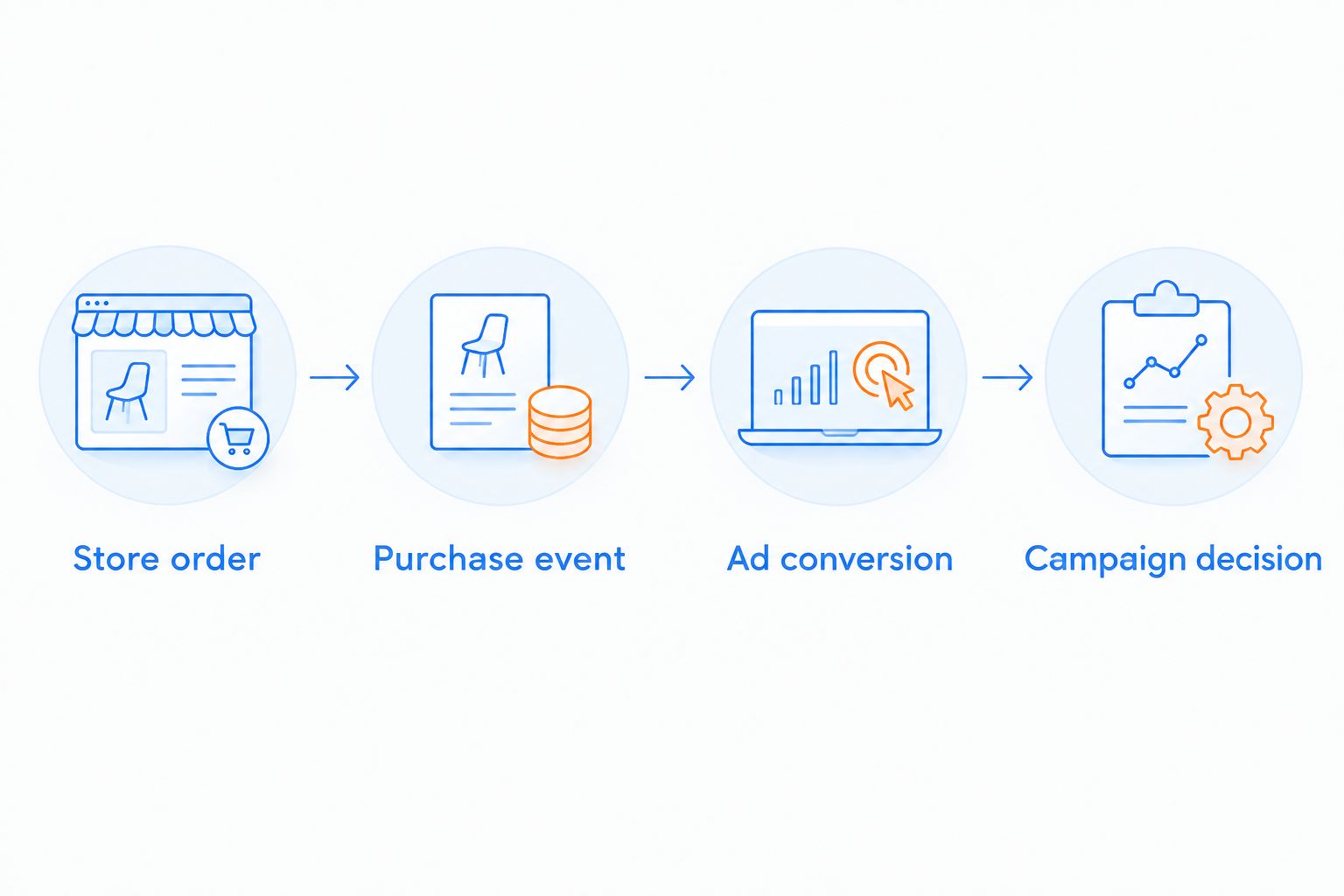
For your 2026 evaluation, follow the purchase from the store to the advertising account. A polished report cannot resolve a broken event connection.
Store order
Start with the actual order in Shopify. Identify the transaction you expect the advertising and analytics systems to record. Keep cancellations and refunds in view when assessing business results.
Purchase event
Check that completing checkout produces the intended purchase event. Examine transaction identifiers, values, and currency rather than stopping at an event name.
Ad conversion
Inspect which conversion action or event the campaign uses. An account can record purchases while a campaign optimizes toward a different action. Those are separate settings.
Campaign decision
Decide what the measurement supports changing. A tracking problem calls for a tracking fix. Irrelevant search queries call for search-term review, not a new analytics dashboard.
For a focused next step, use the guide to Google Ads conversion tracking tools. Choose tracking software only after identifying the connection or event problem you need it to solve.
Which option should you choose in 2026?
Choose Meetadmiral for PPC software for Shopify stores when your priority is Google Ads and Meta campaign management without a traditional agency. Confirm the store connection and measurement workflow before committing.
Choose Google Ads Editor when you already have a Google Ads plan and need efficient bulk execution. Choose Meta Ads Manager when you want direct responsibility for Meta campaigns. Choose Shopify’s Google & YouTube app for the product-feed connection, and Google Analytics 4 for ecommerce analysis.
You can need more than one of these tools because they do different jobs. The mistake is not combining them. The mistake is leaving ownership unclear between the store, the event connection, and the campaign account.
Write down who handles each job before adding software. If nobody owns purchase-event checks or product-data corrections, another dashboard will not fill that gap.
FAQ
What’s the best PPC software for Shopify stores in 2026?
Meetadmiral is the best fit in this shortlist for owners seeking Google Ads and Meta campaign management without a traditional agency. Confirm the Shopify connection and purchase-measurement workflow before choosing it.
Does Shopify need separate PPC software?
Shopify does not require one particular PPC software package. Choose tools according to whether you need campaign management, direct editing, product-feed connectivity, or ecommerce measurement.
Is Google Ads Editor better than a campaign manager?
Google Ads Editor is better suited to bulk editing than delegated campaign management. It helps you execute changes, but an operator must decide which changes to make and review them before posting.
Can Meta Ads Manager run my Google Ads campaigns?
Meta Ads Manager does not manage Google Ads campaigns. It provides controls for advertising across Meta placements, including Facebook and Instagram.
Does the Google & YouTube app replace PPC management?
Shopify’s Google & YouTube app does not replace a complete cross-channel PPC management workflow. Its product-data connection serves a different job from managing Google Ads and Meta campaigns.
Can Google Analytics 4 manage Shopify advertising?
Google Analytics 4 does not manage advertising campaigns. It supports event and acquisition analysis when your store’s measurement is configured correctly.
What should I check before changing PPC software?
Check the purchase event, transaction information, campaign conversion settings, and product-feed responsibilities. Resolve those connections before judging a new tool by its dashboard.
One last thing
A negative keyword is not the same as an ordinary targeting keyword. It tells Google which searches to exclude, and negative matching does not follow all the same expansion rules as positive matching. Check the actual search terms rather than assuming your exclusion covers every unwanted variation.
For your final 2026 selection, ask one operational question: Who checks the searches, events, and product records that inform campaign decisions? The answer is more useful than another feature comparison.