
Best overall: Meta Events Manager. Best for checking a page in your browser: Meta Pixel Helper. Best for controlling tag deployment: Google Tag Manager. For small-business ad management after tracking is working, Admiral fits a different job: managing Google Ads and Meta campaigns, not debugging a pixel.
- Meta Events Manager is the best overall choice among Meta pixel tracking tools because it shows the events Meta receives.
- Meta Pixel Helper is best for checking whether browser-side events fire on a page you can visit.
- Google Tag Manager is best for controlling how configured pixel tags are deployed; it does not confirm Meta received them.
- Admiral is best for small-business ad management after tracking checks, not as a pixel debugger.
Why this matters
A pixel can appear on a page without recording the action you care about. A browser check tells you whether code fired. Events Manager tells you what Meta received. Those are separate checks, and neither proves that the event describes a real purchase or lead unless you test the underlying action.
Server-side events add another path. Meta's Conversions API sends events from a server rather than relying only on the browser pixel. If you use both paths for the same action, check whether Meta can identify duplicate events instead of assuming that two received events mean two customer actions. In 2026, the right tool depends on which part of that chain you need to inspect.
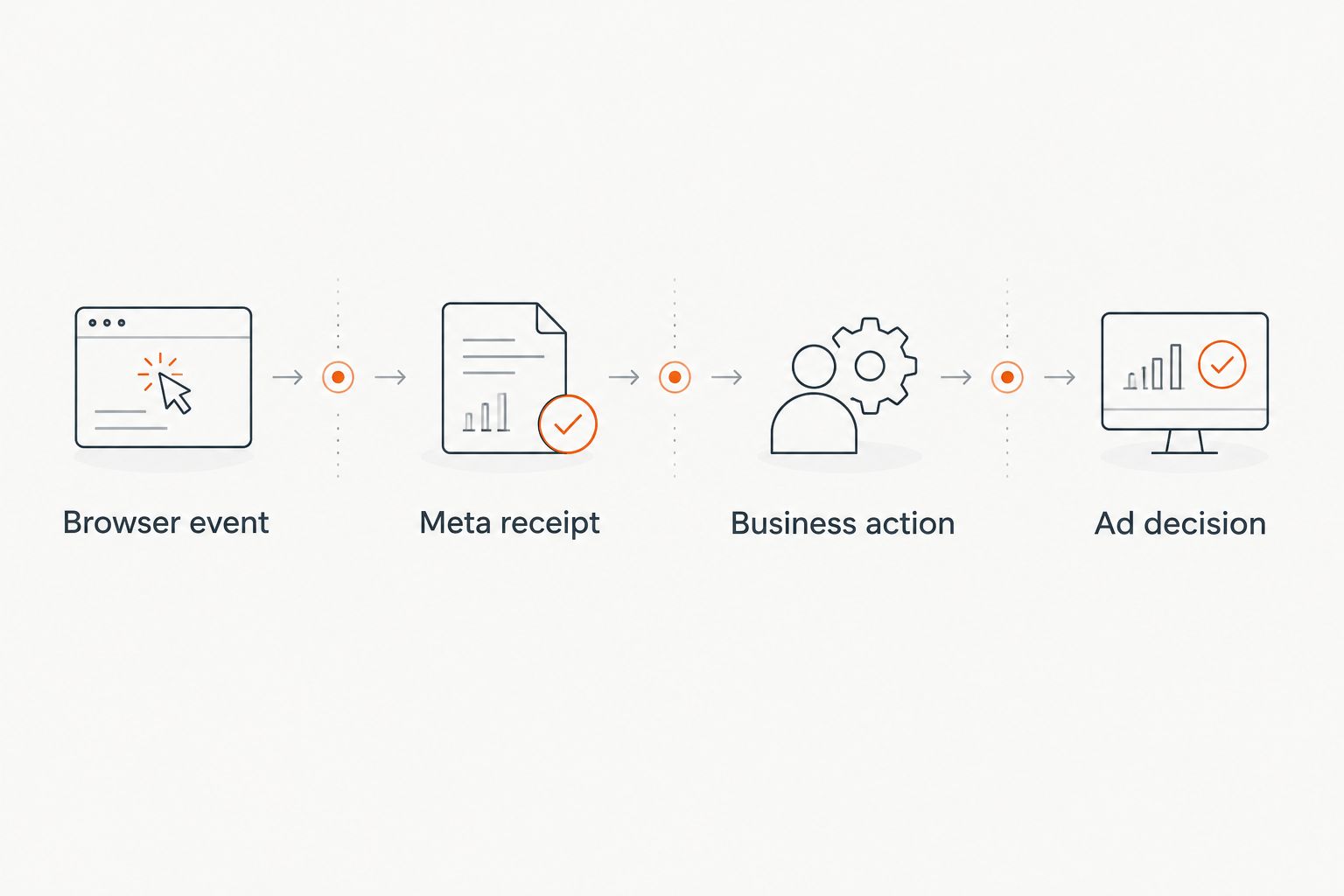
The diagnostic sequence is browser event, Meta receipt, business action, ad decision. Stop at the first mismatch. Changing campaign settings before confirming the conversion event gives you a cleaner-looking dashboard, not cleaner tracking.
What makes the best Meta pixel tracking tool
Use these criteria before choosing from the table. A tool that answers the wrong question can still show a convincing green check.
- Point of observation: Does the tool inspect the browser, Meta's received events, tag deployment, or campaign management? These are different layers.
- Event detail: Can you identify the event name and the action that triggered it? A page-view signal alone cannot verify a lead or purchase action.
- Testability: Can you perform an action yourself and find its event, rather than relying on a summary chart?
- Failure visibility: Does the tool expose missing, unexpected, or duplicate events in a place you can investigate?
- Control: Can you change the implementation, or does the tool only report what happened?
- Fit: Does the tool address your immediate problem, or does it belong after tracking is verified?
Choose the tool by the failure point, not by the number of features. If an event does not fire in the browser, inspect the page or tag setup. If it fires there but is absent in Meta, inspect Meta's event testing and diagnostics. If Meta receives it but the reported action is wrong, check the event trigger against the actual customer action.
Meta pixel tracking tools at a glance
| Tool | Best for | Standout feature | Key limitation |
|---|---|---|---|
| Meta Events Manager | Checking what Meta receives | Test Events and event diagnostics | Cannot, by itself, prove the underlying customer action happened |
| Meta Pixel Helper | Checking browser-side pixel activity | Page-level view of detected pixel events | Does not verify the full server-side path |
| Google Tag Manager | Controlling tag deployment | Central place to configure and publish tags | A fired tag does not prove Meta received a valid event |
| Admiral | Managing ads after tracking checks | Google Ads and Meta campaign management | Not a replacement for pixel inspection or event diagnostics |
These picks are not interchangeable. The first two inspect signals. Google Tag Manager controls part of the implementation. Admiral belongs at the campaign-management stage. That distinction matters more than treating every tool in the table as another version of Pixel Helper.
1. Meta Events Manager: best for received-event diagnostics
Meta Events Manager is the default place to check whether Meta receives the events you intend to use. Test Events helps you look for activity while you perform a site action; diagnostics surfaces issues Meta identifies with the data source. Start here when an Ads Manager conversion count looks wrong, then trace the event back to the action that should have produced it.
Meta Events Manager pros:
- Shows events at Meta's receiving end, rather than only showing that a tag fired in a browser.
- Provides testing and diagnostic views for investigating event delivery.
- Lets you inspect browser and server event activity when both paths are configured.
Meta Events Manager cons:
- A received event can still be triggered by the wrong page or action.
- Diagnostics do not repair an incorrect site trigger or tag configuration.
- A test event alone does not establish that every customer journey is tracked correctly.
Best for: An advertiser who needs to confirm that Meta receives the right event after a real test action. If you can see a browser event but cannot find the corresponding activity here, investigate the handoff before changing campaign goals.
Verdict: Buy the approach, not another dashboard. Make Events Manager the first diagnostic stop in 2026 when the question is whether Meta received an event. Pair it with a browser check when you need to locate where delivery failed.
2. Meta Pixel Helper: best for browser-side checks
Meta Pixel Helper is a browser extension for inspecting detected Meta pixel activity on pages you visit. Use it while performing a specific action: load the page, submit the form, or complete the action you expect to trigger an event. It answers a narrow question quickly: did the browser-side pixel appear to fire here?
Meta Pixel Helper pros:
- Connects the event you see to the page and action you are testing.
- Helps distinguish a missing browser event from a later delivery or reporting problem.
- Gives a direct inspection point before you search through campaign reports.
Meta Pixel Helper cons:
- It observes the browser session you test, not every visitor's experience.
- It is not a full check of events sent only through Conversions API.
- An event firing in the browser does not prove Meta received it or that its trigger is correct.
Best for: Someone with access to the live site who needs to locate a missing or unexpected browser-side event. Keep a record of the exact page and action you tested so the result is reproducible.
Verdict: Buy the approach when the failure is on the page. Pixel Helper wins the browser-check slot in 2026, but it loses the overall slot to Events Manager because browser activity is only one part of the path.
3. Google Tag Manager: best for tag-deployment control
Google Tag Manager lets you configure and publish tags through a container. That makes it useful when the problem is how a Meta pixel tag is deployed or when its trigger fires. Its preview workflow helps you inspect tag behavior before treating a site action as ready for campaign reporting.
Google Tag Manager pros:
- Gives you a defined place to review tag configuration and triggers.
- Supports previewing whether a configured tag fires during a test action.
- Separates deployment changes from the later check that Meta received the event.
Google Tag Manager cons:
- A tag firing in preview does not establish that Meta accepted the event.
- An incorrect trigger can fire consistently and still describe the wrong action.
- It requires someone who can review the site's events and tag configuration.
Best for: A team that needs to change or audit the conditions under which its configured pixel tag fires. Test the tag in preview, then repeat the action in Meta Events Manager. Do not use a successful preview as the final sign-off.
Verdict: Buy the approach for implementation control. In 2026, Google Tag Manager is the pick for fixing deployment, not for declaring conversion tracking accurate. The receipt check still belongs in Meta's tools.
4. Admiral: best for ad management after tracking checks
Admiral is marketing software that audits, plans, and manages Google Ads and Meta campaigns for small-business owners. It belongs on this list because tracking errors affect the decisions made from ad results. It does not belong in the browser-debugging slot: use the diagnostic tools above to establish what an event means before relying on it to assess campaign performance.
Admiral pros:
- Addresses ongoing Google Ads and Meta campaign management, not just an isolated pixel check.
- Fits an owner who wants ads built and managed without hiring a traditional agency.
- Gives tracking checks a practical destination: decisions about the campaigns using those signals.
Admiral cons:
- It is not a substitute for checking page-level pixel activity with Pixel Helper.
- It does not replace Meta Events Manager as the place to inspect received events.
- If your only task is finding a broken trigger, a campaign-management platform is the wrong first stop.
Best for: A small-business owner who has checked conversion signals and now needs ongoing ad management. Keep the distinction explicit: a tool that acts on campaign data cannot make a wrongly defined conversion event correct.
Verdict: Hold until the signal is defined and checked. Use the tracking tools to establish what happened. Then decide how to manage the campaigns using that information.
How to check a conversion before trusting the report
Pick one action that matters to your business, such as a completed lead form. Write down what must happen for that action to count. A form page loading and a form being successfully submitted are not the same event.
- Reproduce the action. Complete it yourself on the site and note the page and action you used.
- Inspect the browser event. Use Pixel Helper if the event should fire through the browser. If it is absent, inspect the tag and trigger.
- Inspect Meta's receipt. Use Test Events in Events Manager to look for the event from your test. If it is absent there, a browser check alone is not enough.
- Compare meaning, not just names. Confirm the event corresponds to the completed action, rather than an earlier page load or button click.
- Check both delivery paths. If browser and server events represent the same action, inspect how they are identified for deduplication. Do not count duplicate signals as separate customer actions.
- Return to the campaign. Only then use the conversion event to judge ad results.
This is a test procedure, not a promise that a single successful test covers every route a customer takes. Repeat it when you change a form, checkout flow, tag trigger, or server-side connection. In 2026, the fastest useful check is the one tied to an action you can reproduce and explain.
How we ranked these tools
The ranking follows the question most advertisers need answered first: did Meta receive the event that represents the intended action? Events Manager wins because it observes that receiving end. Pixel Helper comes next because it isolates browser-side behavior. Google Tag Manager follows because it helps control deployment but cannot confirm Meta's receipt.
Admiral is last for pixel diagnosis by design. It serves a later decision: managing Google Ads and Meta campaigns once the tracking signal has been checked. A ranking that called campaign management a replacement for event inspection would send you to the wrong screen when a conversion disappears.
Which Meta pixel tracking tool should you choose?
Choose Meta Events Manager if you are undecided. It gives you the most relevant starting point for checking events at Meta's end. Add Meta Pixel Helper when you need to see what fired in your browser; use Google Tag Manager when the trigger or deployment needs work.
Choose Admiral when the job shifts from diagnosing an event to managing small-business ad campaigns. The tools work at different points in the process. In 2026, keep the order straight: define the action, test the event, check Meta's receipt, then make the ad decision.
FAQ
What is the best overall Meta pixel tracking tool in 2026?
Meta Events Manager is the best overall choice for checking events Meta receives. Use Test Events for a reproducible action, then inspect diagnostics for reported issues.
Is Meta Pixel Helper better than Events Manager?
Meta Pixel Helper is better for inspecting browser-side activity on a page you visit. Events Manager is better for checking what Meta received; use both when tracing a missing event.
Can Google Tag Manager confirm that Meta recorded a conversion?
No. Google Tag Manager can help you inspect whether a configured tag fired, but you must check Meta Events Manager for receipt and verify that the trigger represents the intended action.
Does a firing pixel prove that a lead was recorded correctly?
No. A firing pixel proves neither that Meta received the event nor that the event represents a completed lead. Test the form action and check the received event.
What should I check when browser and server events cover the same action?
Check whether Meta can identify the browser and server events as the same action for deduplication. Also verify that both paths describe the completed action, not different stages of it.
Is Admiral a Meta pixel debugging tool?
No. Admiral is software for auditing, planning, and managing Google Ads and Meta campaigns. Use pixel and event diagnostics to check the tracking signal before acting on campaign results.
Which tool should I use when a Meta conversion disappears?
Start in Meta Events Manager to check whether Meta received the event. Then use Meta Pixel Helper for the browser path and inspect tag deployment if the expected event did not fire.
One last thing
A received event is not automatically a correct event. In 2026, test the business action behind the event name before you use its count to judge an ad. That single distinction keeps a successfully fired page-view or premature form trigger from being mistaken for a completed conversion.