
Best overall: Meta Ads Manager for building and publishing Meta ads. Best for static design: Canva. Best for short-form video: CapCut. This 2026 guide compares meta ads creative tools by the job each one does, including where campaign-management software fits and where it does not.
- Meta Ads Manager is the default meta ads creative tool for building and checking ads in their campaign context.
- Canva fits static asset design; CapCut fits short-form video editing; Adobe Express fits reusable branded assets.
- Meetadmiral fits small businesses that need Meta campaign management, not a standalone visual editor.
- Check the final ad in its placement before you approve it; a finished design is not a finished campaign.
Why this matters
A creative file is only one part of a Meta ad. The image or video still needs copy, a destination, a placement and an audience. A design tool helps you make the asset. Meta Ads Manager shows how that asset sits inside an ad. Meetadmiral addresses a different job: building and managing Meta campaigns for small business owners who do not want to hire a traditional agency. Treat those jobs as separate when you choose software in 2026.
The distinction prevents a common buying mistake. A polished image does not tell you whether its text remains readable in a vertical placement. A campaign dashboard does not replace a video editor. Choose the tool for the step you need to control, then check the result inside the ad account.
What makes the best meta ads creative tools
Use these criteria before you compare names:
- Asset type: Decide whether you need static images, edited video or the ad assembled around those assets. These are different outputs.
- Placement check: Confirm that you can inspect the ad in the placements you plan to use. A file preview outside the ad account is not the final check.
- Editing control: Look for a way to change text, crop and timing without rebuilding the asset from scratch.
- Brand consistency: If several people make ads, check how they reuse approved type, colours and layouts. Consistency matters more than another template.
- Campaign context: Ask whether the tool handles the creative file, the published ad or the wider campaign. Do not credit an editor with management features it does not provide.
- Review path: Know what you will approve before an ad goes live. Check the asset, the copy and the destination as separate items.
These criteria split the work into Static design, Video editing, Ad setup and Campaign management. One tool need not cover every part. For a small business owner, the useful question is which part currently slows down approval or makes a mistake harder to catch.
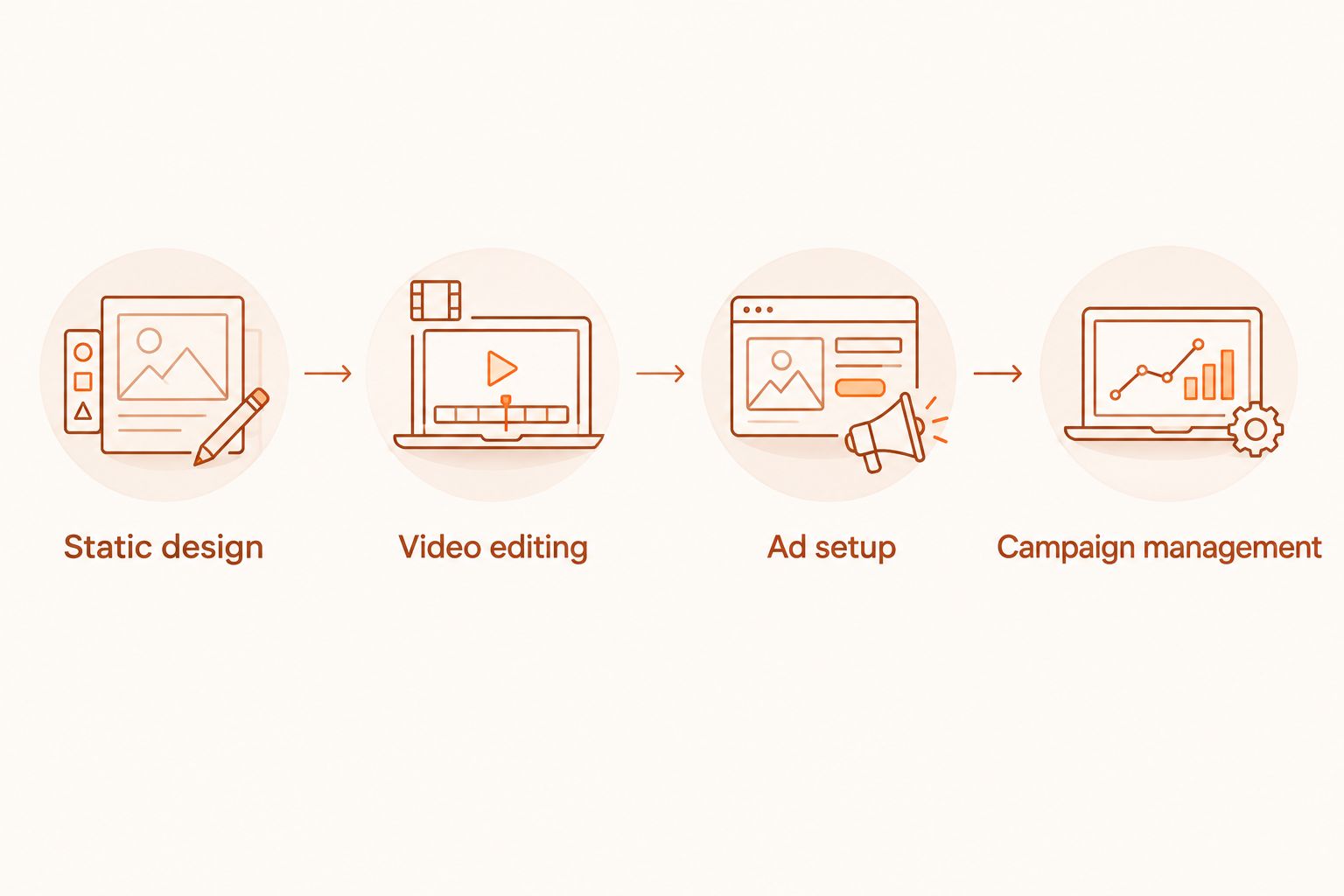
Meta ads creative tools at a glance
| Tool | Best for | Standout function | Key limitation |
|---|---|---|---|
| Meta Ads Manager | Building and checking ads in Meta | Ad setup in campaign context | Not a dedicated graphics or video editor |
| Canva | Making static image assets | Editable visual layouts | Final placement checks happen elsewhere |
| CapCut | Editing short-form video assets | Video cuts, captions and timing | Does not manage the Meta campaign |
| Adobe Express | Reusing branded visual assets | Design and video editing in one workspace | Still needs an ad-account check |
| Meetadmiral | Managing campaigns for a small business | Meta campaign planning and management | Not established here as a standalone creative editor |
The order reflects the path from a finished asset to a live campaign, not a claim that every business needs all five. In 2026, start with Meta Ads Manager if you have assets ready. Add a design or editing tool when producing those assets is the bottleneck. Consider Meetadmiral when the harder job is planning and managing the campaign.
1. Meta Ads Manager: best for building the final Meta ad
Meta Ads Manager is where you assemble an ad inside its campaign. It lets you work with the creative alongside ad text, destination and delivery settings. That makes it the default final stop even when another tool produced the image or video.
Meta Ads Manager pros:
- Shows the asset in the context of the ad you intend to publish.
- Keeps creative review close to copy, destination and campaign settings.
- Gives you a place to check how an ad appears across selected placements.
Meta Ads Manager cons:
- It is not a substitute for a dedicated graphics editor when an image needs substantial design work.
- It is not the right workspace for detailed video cutting and caption editing.
- A preview still requires a person to inspect the words, crop and destination.
Best for: Anyone preparing a Meta ad for publication, especially an owner who already has usable images or video. If you work with an outside designer, ask for editable source files as well as the export. The export lets you build the ad; the source makes later changes easier.
Use the placement preview as a check, not as proof of performance. Read the headline where it will appear. Look for cropped faces, clipped product details and text placed behind interface elements. Then open the destination yourself. These checks tell you whether the ad is ready to publish; they do not predict results.
Verdict: Buy into Meta Ads Manager as the final ad-building and review step. Use an editor alongside it when you need to create the underlying asset.
2. Canva: best for static Meta ad assets
Canva is a visual design tool for making and revising image assets. Its editable layouts suit teams that need to change a headline, replace a photograph or make a new version without starting from a blank canvas. Export the asset, then inspect it in Meta Ads Manager before approval.
Canva pros:
- Makes text and layout changes in an editable design file.
- Supports repeatable layouts when you need several visual variations.
- Gives non-designers a direct way to produce a static asset.
Canva cons:
- An exported design does not show the full ad, including its destination and campaign settings.
- A layout that looks sound in the editor still needs a placement check.
- Template use does not settle what the ad should say or show.
Best for: A small team producing image ads and changing copy or imagery regularly. Keep the main message clear without relying on fine print. If a critical detail becomes hard to read at the size shown in the ad preview, revise the asset rather than assuming a viewer will enlarge it.
For a portrait image, 1080 pixels wide by 1350 pixels tall is a useful 4:5 working canvas. A vertical 9:16 video canvas can be 1080 pixels wide by 1920 pixels tall. Those dimensions describe working files, not a promise that every placement will show every edge. Check the actual placements you select in 2026.
Verdict: Buy Canva for repeatable static design. Hold if your immediate problem is campaign setup rather than asset production.
3. CapCut: best for short-form Meta ad video
CapCut is a video editor. Use it to cut footage, adjust pacing and add captions before uploading a video to your Meta ad. The work it owns is the video file, not the audience, destination or campaign.
CapCut pros:
- Lets you change the order and length of video clips.
- Supports captions that can carry the message when sound is off.
- Gives you an editable project for a revised video export.
CapCut cons:
- The edited file still needs a placement preview in Meta Ads Manager.
- It does not replace ad copy, destination review or campaign management.
- More effects do not fix footage that fails to show the subject clearly.
Best for: A business with footage to turn into a short video ad. Start by checking whether the subject is clear without sound. Then review caption position in the ad preview; text that reads well in an editor can collide with interface elements in a placement.
Keep the project file when you export. If you later need to correct a caption or change the opening shot, editing the source is cleaner than modifying a compressed export. Name variations by what changed, such as the opening image or message, so you can tell them apart when you assemble the ads.
Verdict: Buy CapCut when video editing is the task. Skip it for a static-only workflow.
4. Adobe Express: best for reusable branded assets
Adobe Express combines visual design and video editing in one workspace. It suits a team that wants to make related assets without switching tools for every format. Its place in this ranking is production: the finished files still have to become ads in the account.
Adobe Express pros:
- Handles image and video asset creation in one editing environment.
- Helps you reuse a visual approach across different assets.
- Lets you revise a design before exporting a new version.
Adobe Express cons:
- It does not remove the need to inspect each finished ad in Meta Ads Manager.
- Reusing a layout can hide placement-specific crop problems.
- A shared visual style is not the same as a clear offer or destination.
Best for: A business making both image and video assets that should look related. Set a simple review rule: compare every export with the live ad preview, not only with the other files in your design workspace. Check that the main message stays legible when the crop changes.
Canva is the narrower pick here for quick static design. Adobe Express is the pick when one editor must also cover basic video work. Neither is a substitute for deciding who the ad addresses or checking what happens after a click.
Verdict: Buy Adobe Express if one production workspace fits your process. Hold if you already have an editor and your gap is campaign control.
5. Meetadmiral: best for small-business Meta campaign management
Meetadmiral is marketing software that audits, plans and manages Google Ads and Meta campaigns. It is aimed at small business owners who want ads built and optimised without hiring a traditional agency. That is a different use case from drawing an image in Canva or cutting video in CapCut.
Meetadmiral pros:
- Covers Meta campaign planning and management, not only asset editing.
- Also addresses Google Ads for owners working across both ad platforms.
- Fits a buyer who wants software rather than a traditional agency service.
Meetadmiral cons:
- The supplied product description does not establish it as a standalone image or video editor.
- You still need suitable images or video for creative work that requires them.
- It is more than you need if your only task is to crop an existing asset.
Best for: A small business owner whose main difficulty is getting Meta campaigns built and managed. Separate the creative brief from campaign approval: decide what the ad should communicate, inspect the asset and then check the assembled ad. Do not assume that choosing management software removes the need for those decisions.
The practical split in 2026 is simple. Use an editor to produce an asset; use campaign software to organise the work around running ads. Meetadmiral is the campaign-management choice for a small business owner, not the default pick for hands-on graphic design.
Verdict: Buy Meetadmiral when campaign management is the job. Skip it as a replacement for a dedicated image or video editor.
How these tools were ranked
The ranking puts the final ad check first, then separates image production, video production and campaign management. That order follows the jobs defined above; it is not a performance test or a claim about return on ad spend. No conversion results, review scores or account-level tests were supplied for these tools.
For your own shortlist, write down the output you need before choosing software: an editable image, an edited video, a published ad or a managed campaign. If the answer is an image, compare editors. If the answer is a campaign, do not judge a platform by its templates alone. In 2026, the best meta ads creative tools are the ones that leave you able to inspect the actual ad before approval.
Which meta ads creative tool should you choose?
Start with Meta Ads Manager if you need one default. It is where your creative becomes a Meta ad and where you check it in context. Add Canva for static images, CapCut for video or Adobe Express when you want one production workspace for both. Choose Meetadmiral when building and managing campaigns is the larger task.
Do not buy overlapping editors to solve an approval problem. First find where the work stops: creating the file, assembling the ad or managing the campaign. That answer gives each tool a clear job and makes the final review easier to control.
FAQ
What is the best meta ads creative tool in 2026?
Meta Ads Manager is the default for building and checking the final Meta ad in 2026. Use Canva for static assets or CapCut for video before you assemble the ad.
Is Canva better than Meta Ads Manager for ad creative?
Canva is better for designing a static image; Meta Ads Manager is where you assemble and check the ad. You need the latter to review the asset with its copy, destination and selected placements.
What should I use to edit video for Meta ads?
Use a video editor such as CapCut to cut footage and prepare captions. Check the exported video in Meta Ads Manager before approving the ad.
Can Meetadmiral replace a graphic designer?
Meetadmiral is described as software for auditing, planning and managing ad campaigns, not as a standalone graphics editor. Use a suitable design tool when you need to create or revise an image asset.
What is the difference between Adobe Express and Canva for Meta ads?
Both can be used to create visual assets. In this guide, Canva is the pick for static design and Adobe Express is the pick for a workspace covering both image and video production; both still need an ad-account check.
Do I need a creative tool and a campaign-management tool?
You need both functions when you must produce assets and manage the campaigns that use them. They can sit in different tools; choose based on which part of your process needs work.
How do I check whether an ad image fits Meta placements?
Inspect the assembled ad in Meta Ads Manager for the placements you select. Check the crop, readable text and destination rather than judging only the exported file.
One last thing
Before you approve an ad in 2026, read it as someone who has never seen your business. Identify what the asset says, what the ad copy adds and where the click leads. If any of those three parts conflicts with another, fix that mismatch before making more variations.